Current State of the Internet in the U.S. 2025

HighSpeedOptions prides itself on providing honest, quality content. While we may be compensated when you make a purchase through links on our site, all opinions are our own. Here's how we make money.

The internet in the U.S. is nearly ubiquitous, but not uniformly accessible. Speeds continue to rise, device habits keep shifting, and affordability programs have changed. This page distills the latest signals into a fast, factual overview you can scan in a minute and explore in depth by section.

Find the best, most reliable internet near you.

internet graphic

Who Has Access to Modern Broadband (100/20 Mbps)?

Most U.S. residents have access to the Federal Communications Commission’s (FCC) minimum broadband benchmarks of 100 Mbps download and 20 Mbps upload. But rural access gaps persist.

MetricU.S. ShareRural Share
U.S. population with access to fixed broadband94%72%
Source: The FCC Broadband Data Collection (BDC) Program’s 2024 §706 Report
MetricU.S. population with access to fixed broadband
U.S. Share94%
Rural Share72%
Source: The FCC Broadband Data Collection (BDC) Program’s 2024 §706 Report

Methods: The BDC reflects availability reported by internet providers, not measured performance.

How many people use the internet, and how are they connecting?

About 95% of U.S. adults are online, 80% have home broadband, and 90% own a smartphone as of August 2025. Of those adults, 15% are smartphone-only (own a smartphone but not home broadband), which is adequate for quick access but limiting for homework, uploads, and large files.

How often do U.S. adults go online?

Adults are online. A lot. The chart below shows the online activity of adults captured by a self-reported internet use frequency survey from the Pew Research Center in 2024.

MetricShare
Adults who are online almost always41%
Adults who go online every day90%
Adults who do not use the internetLess than 5%
MetricAdults who are online almost always
Share41%
MetricAdults who go online every day
Share90%
MetricAdults who do not use the internet
ShareLess than 5%

What is the U.S. median fixed broadband speed?

U.S. median fixed (not mobile connectivity) internet speed was 285.6 Mbps download and 49.2 Mbps upload in August 2025. (Source: Ookla’s Speedtest Global Index)

Top 10 Fastest Countries by Average Download Speed
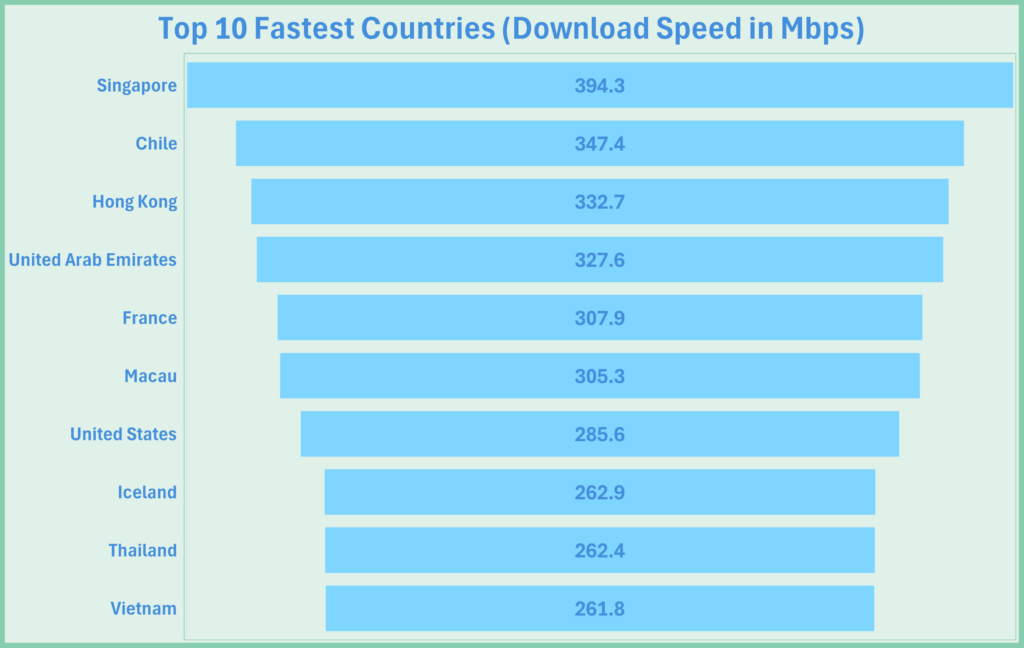
Graph showing the top 10 fastest countries by average download speed

Top 10 Fastest U.S. Cities by Average Download Speed
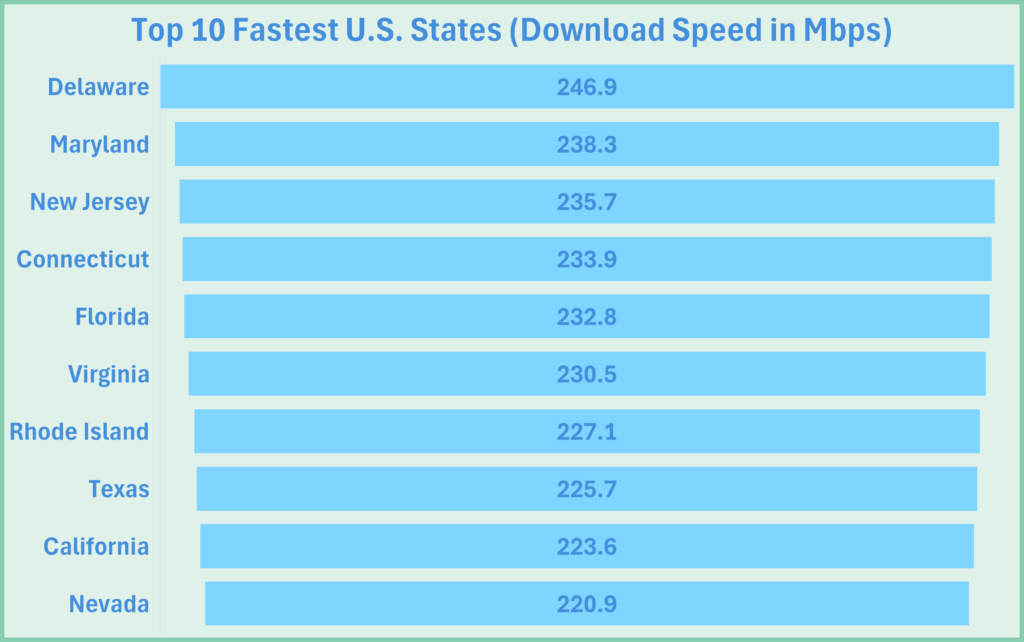
Graph showing the top 10 fastest U.S. cities by average download speed.
Source: BroadbandSeach.net August 2025

Are Americans browsing more on desktop or mobile?

In September 2025, almost 55% of connections were from desktops, about 45% from mobile devices, and less than 10% were from tablets. 

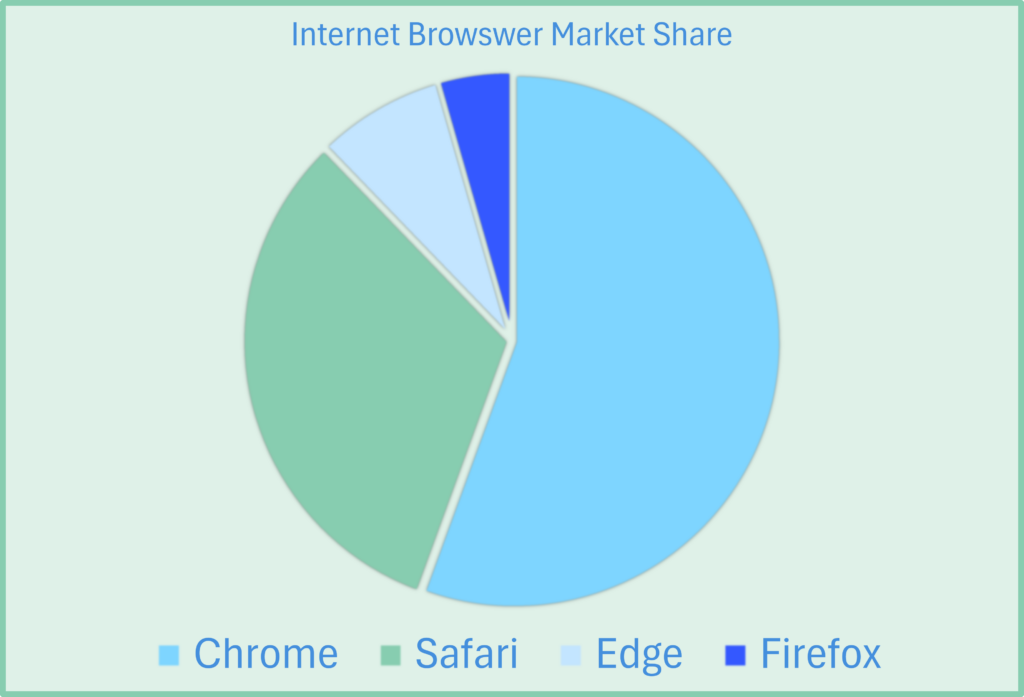
U.S. Browser Share (September 2025): 

  • Chrome: 53%
  • Safari:29%
  • Edge 7%
  • Firefox: 4%
Graph showing internet browser market share.

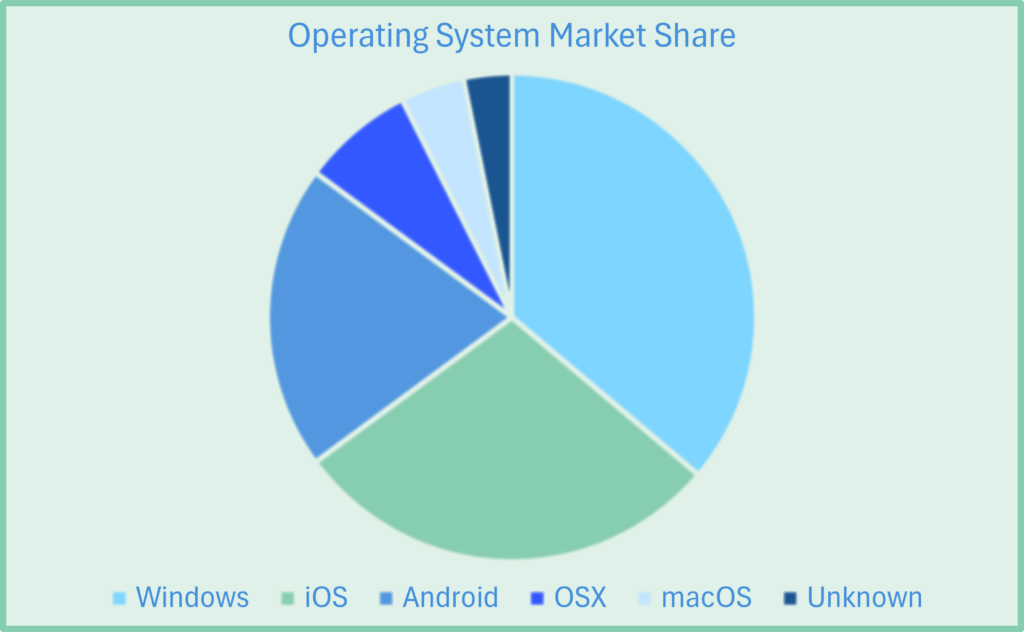
U.S. Operating System Share (September 2025):

  • Windows: 34.26%
  • iOS: 27.21%
  • Android: 19.34%
  • OS X: 7.11%
  • macOS: 4.32%
  • Unknown: 2.59%.
Graph showing operating system market share.

What happened after ACP ended, and what discounts are available?

The Affordable Connectivity Program (ACP) ended June 1, 2024, but new applications and enrollments into the program closed on February 7, 2024. As a result, millions of Americans lost or received reduced discounts as program funds expired. Point readers to remaining options.

Alternatives to the ACP do exist, though. Below are a few ways to help manage internet costs.

Internet Service Financial Relief and Assistance Options

ProgramWho qualifiesTypical benefitHow to apply
LifelineIncome ≤135% FPG or participation in SNAP, Medicaid, SSI, Veterans Pension, Federal Public Housing, or Tribal programsUp to $9.25/mo discount on phone or internet; up to ~$34.25/mo on Tribal landsCheck eligibility, choose a participating provider, apply via National Verifier, and enroll with the provider.
Provider Low-Income PlansIncome-based; often participation in SNAP/Medicaid or student/senior status; varies by ISP and locationDiscounted broadband (typ. 25–100+ Mbps) with flat pricing and no contracts/equipment fees (varies)Plans vary by provider. Visit our fixed income internet guide for a list of available plans.
State & Local InitiativesVaries by state/city: income limits, student households, seniors, Tribal members, public-housing residentsVouchers, bill credits, device hotspots, or subsidized plans; amounts and duration varyCheck your state’s broadband office, city programs, libraries, and housing authorities.
ProgramLifeline
Who qualifiesIncome ≤135% FPG or participation in SNAP, Medicaid, SSI, Veterans Pension, Federal Public Housing, or Tribal programs
Typical benefitUp to $9.25/mo discount on phone or internet; up to ~$34.25/mo on Tribal lands
How to applyCheck eligibility, choose a participating provider, apply via National Verifier, and enroll with the provider.
ProgramProvider Low-Income Plans
Who qualifiesIncome-based; often participation in SNAP/Medicaid or student/senior status; varies by ISP and location
Typical benefitDiscounted broadband (typ. 25–100+ Mbps) with flat pricing and no contracts/equipment fees (varies)
How to applyPlans vary by provider. Visit our fixed income internet guide for a list of available plans.
ProgramState & Local Initiatives
Who qualifiesVaries by state/city: income limits, student households, seniors, Tribal members, public-housing residents
Typical benefitVouchers, bill credits, device hotspots, or subsidized plans; amounts and duration vary
How to applyCheck your state’s broadband office, city programs, libraries, and housing authorities.
  • Lifeline: Ongoing federal benefit that reduces monthly phone or internet bills for eligible households based on income or participation in programs like SNAP, Medicaid, SSI, or Tribal assistance.
  • ISP low-income plans: Provider-run discounted internet offers (e.g., Internet Essentials, Access from AT&T) with simple eligibility, flat pricing, and speeds suitable for everyday work and school.
  • State & local initiatives: Location-specific vouchers, discounts, or digital-equity programs (often via broadband offices, libraries, or housing authorities) that can complement federal and internet provider options.

For more information on these alternatives and eligibility, see our resource on low and fixed-income internet options.

Why do people skip home internet?

Some Americans opt out of home internet due to limited access, cost, or choose to rely solely on smartphones.

Access: By the FCC’s current 100/20 Mbps benchmark, about 94.1% of the U.S. population has access to fixed broadband (BDC Dec 2022). For comparison, about 72% of rural residents have access to broadband minimums.

Affordability: According to the Pew Research Center, roughly one in five adults lacks home broadband, and non-adopters frequently cite monthly cost among their reasons; meanwhile, industry data show prices declining as speeds increase.

Smartphone-only: The Pew Research Center also reported in 2024 that around 15% of adults rely on a smartphone without home broadband.

For context, that’s about 50 million people who choose to solely use their smartphones at home rather than subscribe to broadband service. s technology becomes more efficient, we’ll see more people opt for smaller devices as a means to connect to the internet. 

Final Thoughts: A Connected But Divided U.S.

America’s internet picture is strong and improving, but uneven. Access at modern benchmark speeds has expanded, typical speeds keep climbing, and most adults are online. Rural availability lags in higher-tier plans, uploads still trail downstream gains, and the end of ACP reshaped affordability for many households. For more information about the internet access gap, visit our U.S. Digital Divide resource.

What it means for readers

  • Choose by use case: For multi-user homes with video calls, cloud backup, and creator workflows, target plans that comfortably meet or exceed 100/20 Mbps, with extra headroom for uploads.
  • Mind the device reality: Design, test, and budget for a desktop + mobile world; each dominates different tasks.
  • Check affordability options: With the end of the ACP, take a look at Lifeline, internet provider low-income plans, and state or local aid; eligibility and pricing change, so verify current terms.

What to watch next

  • Buildout & BEAD deployments: Expect availability shifts as projects complete; revisit the Access & Availability module for new vintages.
  • Upstream improvements: More symmetrical tiers and fiber builds could narrow the upload gap.
  • Pricing dynamics: Promotional pricing and low-income offers evolve; we’ll update the Affordability table as programs change.
  • Measurement differences: Keep reading captions and methods—BDC availability, measured performance, and provisioned speeds answer different questions.

To find internet providers near you, enter your zip code below!

FAQ

FAQs: Current State of Internet in the U.S.

The most telling statistic is that 95% of adults are online, meaning 1 in 20 adults do not use the internet. Of the 95%, 15% connect to the internet using only their smartphone, while 80% use home broadband. The median internet speeds in the U.S. are 286 Mbps download and 49 Mbps upload.

It depends on the metric—median speed, upload, latency, jitter, fiber availability, consistency, and price. Let’s use the most common qualifier: speed. In 2024, Ookla found that Connecticut had the fastest average download speed at 273 Mbps. North Dakota had the fastest upload speed at 93.09 Mbps. These averages are for fixed broadband, not mobile.

In the U.S., mobile accounts for about 45% of web traffic, while desktop accounts for roughly 55%. Nearly 9 in 10 adults own a smartphone in the U.S., and 15% rely only on smartphones to access the internet.

The FCC’s current benchmark is 100 Mbps download and 20 Mbps upload for fixed broadband.

Roughly 94% of the U.S. population has access, while rural availability is closer to 72%. See Who Has Access to Modern Broadband (100/20 Mbps)?

Rural internet options are scarce due to lower population density, which reduces ROI on build-out costs and slows fiber or cable deployment. Funding programs (e.g., BEAD) aim to close those gaps.

Availability (e.g., FCC BDC) shows where providers say a service can be installed; it’s not a speed indicator. Performance reflects measured speeds from users or test platforms.

As of August 2025, the U.S. median fixed internet speed was 285.6 Mbps download and 49.2 Mbps upload. That’s median performance, not a guaranteed plan speed.

Check Lifeline, internet provider low-income plans (e.g., Internet Essentials, Access from AT&T), and state/local initiatives. Eligibility varies; verify details with the specific program and provider.

Enter your ZIP code in our internet provider search tool to view available providers and plans near you. Here you can compare prices, speeds, data policies, and more.

Keith Carlson
Written By
Keith Carlson
Written By
Keith Carlson
Keith is a Contributing Writer for HighSpeedOptions with a background in writing, SEO, GEO, and marketing. He has written for and contributed to organizations in the non-profit, financial, and enterprise internet and cable service industries. At HighSpeedOptions, Keith covers everything from broadband news to emerging technologies and how they complement different lifestyles and budgetary needs. In his free time, Keith enjoys spending time with his family, reading as many books as he can, and photography.

Kuiper vs Starlink: Which Satellite Internet Service Is Better?

HighSpeedOptions prides itself on providing honest, quality content. While we may be compensated when you make a purchase through links on our site, all opinions are our own. Here's how we make money.

Kuiper vs Starlink is quickly becoming the defining rivalry in the satellite internet space. Starlink, developed by SpaceX, is already active in over 125 countries. Meanwhile, Amazon Satellite Internet—via Project Kuiper—is preparing to roll out global service, beginning with underserved areas. Both companies aim to expand connectivity through large-scale LEO satellite constellations, but they differ in deployment timelines, technology strategies, and infrastructure integration. 

Here’s how these internet providers compare and which may be right for you.

Deployment: Who’s Winning the Satellite Race?

  • Launched in 2019, Starlink currently operates 7,000+ satellites
  • Approved for a constellation of up to 30,000 satellites
  • Offers service to 5+ million users worldwide


Project Kuiper: Amazon’s Challenger

  • Launched 27 Kuiper satellites as of April 2025. 
  • Plans to deploy 3,236 satellites by 2029. 
  • Must activate 1,618 satellites by July 30, 2026 to meet FCC requirements


Key Takeaway: While Starlink is operational and global, Kuiper is in early deployment but backed by Amazon’s deep infrastructure and launch capabilities. 

Coverage & Target Users

Feature Starlink Kuiper 
Current Availability Global (125+ countries) Deployment begins late 2025 
Primary Focus Global coverage, including oceans and polar regions Underserved and rural regions (initially mid-latitudes) in Argentina, Brazil, Chile, Columbia, Ecuador, Peru, and Uruguay 
Network Type LEO satellite constellation with laser-linked routing LEO satellite system relying on Amazon Web Services ground stations 
Feature Current Availability 
Starlink Global (125+ countries) 
Kuiper Deployment begins late 2025 
Feature Primary Focus 
Starlink Global coverage, including oceans and polar regions 
Kuiper Underserved and rural regions (initially mid-latitudes) in Argentina, Brazil, Chile, Columbia, Ecuador, Peru, and Uruguay 
Feature Network Type 
Starlink LEO satellite constellation with laser-linked routing 
Kuiper LEO satellite system relying on Amazon Web Services ground stations 


Starlink has led the way with rapid expansion. Project Kuiper, while not fully live, is positioning itself to close the digital divide in underserved regions using its own satellite internet constellation. 

Technology Breakdown: How Do These Systems Work?

  • Operates at ~550 km altitude. 
  • Uses inter-satellite laser links for near-instant data routing. 
  • Offers latency as low as 20–60 ms, great for gaming and video calls. 


Kuiper Satellites 

  • Operate slightly higher at 590–630 km, with three distinct orbital shells
  • No laser links yet—relies on AWS infrastructure and ground stations for connectivity. 
  • Three types of user terminals planned: 
  • Standard terminal: Up to 400 Mbps 
  • Compact terminal: Up to 100 Mbps 
  • Jumbo terminal: Up to 1 Gbps 


Did You Know? Kuiper’s satellite design helps offset signal power loss from higher altitude by using larger antennas and AWS’s global cloud backbone. 

Pricing and Equipment

  • Residential plans: starting at $50/month 
  • One-time equipment cost: starting at $299 
  • Higher-tier business and maritime plans also available 


Kuiper

  • Pricing TBD, but Amazon promises affordability 
  • Mass production modeled after Echo and Fire TV devices 
  • Amazon aims to undercut Starlink’s pricing through economies of scale 


Infrastructure Edge: While Starlink builds everything in-house, Amazon is leveraging its AWS infrastructure and diverse launch partners, including Blue Origin and ULA, to scale quickly. 

Satellite Constellation Design

Both Starlink and Kuiper use LEO satellite systems, which deliver lower latency than traditional geo stationary satellites or MEO satellite options. But their constellation design varies.  

FeatureStarlinkProject Kuiper
Satellite Count (Planned) 7,000–30,000 3,236 
Orbital Altitude ~550 km 590–630 km 
Constellation Type Shell-based mega-constellation Tiered shell constellation 
Latency Lower (20–60 ms) Slightly higher (below 100 ms) 
Routing Inter-satellite laser mesh Ground station/AWS cloud dependent 
Polar/Ocean Coverage Yes Not at initial launch 
FeatureSatellite Count (Planned) 
Starlink7,000–30,000 
Project Kuiper3,236 
FeatureOrbital Altitude 
Starlink~550 km 
Project Kuiper590–630 km 
FeatureConstellation Type 
StarlinkShell-based mega-constellation 
Project KuiperTiered shell constellation 
FeatureLatency 
StarlinkLower (20–60 ms) 
Project KuiperSlightly higher (below 100 ms) 
FeatureRouting 
StarlinkInter-satellite laser mesh 
Project KuiperGround station/AWS cloud dependent 
FeaturePolar/Ocean Coverage 
StarlinkYes 
Project KuiperNot at initial launch 


Expert Insight: The Bigger Picture

“Amazon has the balance sheet and the technology,” says Caleb Henry, director of research at Quilty Analytics told the Financial Times. “Kuiper intends to make tens of millions of terminals. When you get the volumes, that is when you drive terminal prices down to affordable consumer rates. When you get to consumer rates, your market explodes.” 

Both companies are investing billions in next-gen tech to push past the limits of traditional geo stationary satellite systems. 

Factor Choose Starlink If… Choose Kuiper If… 
Availability You need service now You can wait until late 2025+ 
Location You live anywhere, including remote areas You’re in an underserved area targeted by Amazon 
Speed You want real-world tested performance You want gigabit potential with AWS integration 
Reliability You want proven uptime and infrastructure You’re betting on future performance and affordability 

Factor Availability 
Choose Starlink If… You need service now 
Choose Kuiper If… You can wait until late 2025+ 
Factor Location 
Choose Starlink If… You live anywhere, including remote areas 
Choose Kuiper If… You’re in an underserved area targeted by Amazon 
Factor Speed 
Choose Starlink If… You want real-world tested performance 
Choose Kuiper If… You want gigabit potential with AWS integration 
Factor Reliability 
Choose Starlink If… You want proven uptime and infrastructure 
Choose Kuiper If… You’re betting on future performance and affordability 

The battle between Kuiper vs Starlink is more than just a tech rivalry—it’s a race to redefine how the world connects. 

Starlink holds the early lead, offering fast, low-latency service globally via its vast LEO satellite constellation. Project Kuiper, though still ramping up, is backed by Amazon’s scale, cloud expertise, and a strategic focus on underserved communities. 

Whether you’re comparing satellite internet options today—or watching for what’s next—this showdown will shape the future of connectivity far beyond Earth. 

Want to see which satellite internet providers are available near you? 

Nick Welch
Nick has spent years navigating the ever-evolving terrain of the telecom and privacy security space, leveraging his extensive knowledge to create insightful content that addresses common internet-related queries and challenges. Away from work, Nick enjoys spending time outdoors with family and his dog. On weekends you can find him hiking local trails or taking on new running routes.

Amazon & Verizon Team Up for Rural Internet

HighSpeedOptions prides itself on providing honest, quality content. While we may be compensated when you make a purchase through links on our site, all opinions are our own. Here's how we make money.

No matter where you live, post-pandemic times have changed how we do business, go to school, and even work. We live in a new digital era. Everyone is online – because they have to be. But a big problem lies with this fact – not everyone has internet or a fast, reliable internet connection. 

If you live in a rural community with a slow internet connection, that’s about to change. Amazon and Verizon have a big project up their sleeve that may transform the future of rural internet.

Do you live in a rural area?

We’ve compiled a resource that contains all you need to know about getting the best internet options in rural areas.

internet graphic

Project Kuiper is a means to provide fixed wireless internet to areas with low broadband services. Amazon CEO Andy Jassy said it himself: “There are billions of people without reliable broadband access, and no single company will close the digital divide on its own.”

But two tech giants teaming together could close that gap. 

What is Project Kuiper?

Project Kuiper, or Kuiper Systems, comprises 3,236 LEO (low-Earth orbit) satellites. These satellites aim to bring high-speed broadband internet to underserved areas or areas with no internet at all. These areas include individual households, schools, farms, hospitals, businesses, and any organization that needs high-speed broadband internet. 

Verizon CEO Hans Vestburg stated, “…We know the future will be built on our leading 5G network, designed for mobility, fixed wireless access, and real-time cloud computing. More importantly, we believe that the power of this technology must be accessible for all.”

The project was launched in 2019 and officially approved in 2020 for $10 billion. No specific timeline exists yet, but the two companies expect to complete the project by July 2029. If that seems like a long time, don’t worry. Expect a few satellites released by 2026.

Battle of the Tech Giants

Amazon and Verizon 

Amazon and Verizon agreed to this major project for two reasons. One driver is to bring reliable broadband internet to rural communities. However, their primary reason is that the two companies risk losing customers to Starlink. This includes major corporate clients like Google

Amazon and Verizon cannot compete with Starlink on their own, but they can stall.

Amazon chose Verizon because the wireless network company is a leader in the industry. Many people select Verizon because of its coverage. Project Kuiper will expand their 4G/LTE and 5G data networks. Doing so will increase Verizon’s customer base and Amazon’s. 

Starlink, a division of SpaceX, designs, manufactures, and launches spacecraft in the hopes to one day provide high-speed broadband internet worldwide with LEO satellites. Starlink has already launched 1,740 satellites, with 100,000 beta testers offering improvements. 

However, Starlink internet isn’t cheap. It’s $110 per month and is only available in select regions of the United States right now. Users can expect download speeds between 100 Mbps and 200 Mbps. In most locations, latency is around 20ms. 

Verizon’s Fixed Wireless

Fixed wireless covers 36% of the US according to the FCC and is one of the best options for rural internet. So how does it work exactly? Radio signals deliver a fixed wireless internet connection to a nearby transmission tower. This delivers internet within a specific range wirelessly. 

Verizon launched its fixed wireless service in 2018 using 5G. The launch targeted only four markets and offered high speeds covering short distances. Verizon then expanded its reach to 50 newer markets and in 2020 started offering the LTE version. The LTE version covers more distance but slightly slower speeds.

Now, the fixed wireless LTE service is available in all 50 states and in over 200 markets. 

It’s not a surprise that Verizon wants to become a national fixed broadband provider. Verizon sees a need for thousands of communities in the US alone, and people love it. Their fixed wireless LTE service is now in over 11 million households, and we can expect it to grow as the years pass.

So what is there to look forward to with fixed wireless internet?

Benefits of Fixed Wireless Internet

Fixed wireless internet is ideal for many rural areas. Let’s see what benefits come with this service. 

Fast Speeds

Fixed wireless internet isn’t quite as fast as fiber internet, but it’s still pretty quick. Households with fixed wireless can expect download speeds between 40 Mbps to 1000 Mbps. You can enjoy high connection speeds without struggling with a physical connection. 

internet speed graphic

Data Allowance

A data cap is the maximum amount of data a person can use monthly. Everything we do online uses data. Many internet service providers (ISPs) put a cap on how many gigabytes you can use to help manage their network. But some ISPs offer unlimited data, particularly for areas where an internet connection is weak. Fixed wireless can provide unlimited data, or more data, to places where it’s needed. 

Low Installation Costs

Since fixed wireless is cable-free, installation is easy. A transmitter/receiver is fitted to your building or house and is positioned to receive the strongest signal. That’s it. There are no cables to install, making costs cheaper than other connection types

Quick Installation Time

Installation is fast without troublesome cables to handle. A technician needs to adjust the transmitter/receiver. Once that is done, the job is complete. Cabling can take several minutes to hours and requires far more resources to get the job done. 

Completely Wireless

Wires and cables are prone to damage for several reasons. If a cable breaks, the connection is lost until that cable is replaced. Wireless connection means an unwavering connection. For rural areas, fixing a damaged cable or dish is costly since it’s more prone to damage from weather. An utterly wireless internet connection means fewer interruptions and breaks in connectivity. 

Reduced Latency

Latency is the number of data packets transferred from one destination to another. Simply put, it’s a measure of delay. When a page takes forever to load, that’s a latency issue. Wired networks such as DSL and cable tend to have higher latency issues than fixed wireless. 

Fixed Wireless vs. Satellite

Satellite internet is also a popular option for rural communities that don’t have a fixed wireless connection. Both internet services transmit a signal from a distribution point to an access point. The distribution point is where the signal is coming from. The difference between these two internet services lies in the composition and distance from the distribution point.

Satellite’s distribution point is a satellite in Earth’s orbit. Traditional satellites are about 22,000 miles away. On the other hand, fixed wireless distribution points are usually within a few miles of a receiving household much closer.

router placement

As you can imagine, distance affects connectivity and latency. 

We mentioned before that latency is a measure of delay. It’s how long it takes for data to travel from one point to another. If your connection is slow, laggy, moving at a snail’s pace, etc., odds are you have a latency issue. A satellite internet connection has a long way to travel – 22,000 miles! Combine this with other obstacles like weather, and high latency is often a matter of when, not if. 

How does this affect Project Kuiper? 

The satellites used for Project Kuiper are LEO or low-Earth orbiting satellites. They’re not 22,000 miles away. They could be a few thousand miles away. However, this signal still has to travel further than a fixed wireless internet connection.

Fixed wireless connection has to travel a meager 10 miles to reach an access point. Even in terrible weather, 10 miles is nothing compared to the hundreds of miles for satellites. 

Satellite is experiencing some exciting changes through Project Kuiper. It’s improving. It may not be ready by next year, but we can look forward to progress.

The Future of Rural Internet

If you think space travel is the future, wait until you see how the internet and space travel combine. Providing internet in rural areas may seem like a boring subject to some. But giving internet connection to these communities provides opportunities the world has yet to see.

Rural communities are where much of our food is grown. Imagine how bringing the internet to these areas would affect agriculture. Smart farms will usher in energy efficiency and manufacturing. Transportation will change. No longer will there be food deserts. Not to mention the increase in job opportunities.

The internet changed our world and isn’t stopping any time soon. So brush up on your internet vocabulary. It really is rocket science now!

Marla Milano
Marla is a Contributing Writer for HighSpeedOptions, assisting in HighSpeedOptions’ coverage of satellite internet, streaming, and TV content. She comes with five years of experience writing for lifestyle and tech brands across multiple industries and has a BA in Marketing and MA in Digital Communication and Media Arts from DePaul University. Marla is passionate about not only integrating a creative edge into her work but also pulling data-driven insights to enhance her thought process.

Cheapest Midco Internet Plans

HighSpeedOptions prides itself on providing honest, quality content. While we may be compensated when you make a purchase through links on our site, all opinions are our own. Here's how we make money.

Don’t get bogged down searching for affordable internet. Depending on your location, there are likely regional or local options that offer more bang for your buck than bigger national names. If you live in the north, Midcontinent Communications (Midco) may be the right choice for you.

As its name suggests, Midco is a Midwest cable internet provider that offers one of the cheapest high-speed internet plans starting at just $14.95/mo. Available to both rural and urban communities, Midco makes heads turn with its plan variety and added perks.

We break down Midco internet and the best options available if you’re shopping on a budget.

  • Midwest ISP
  • Fast rural internet options
  • No contracts or data caps

Midco Internet

Dad and son using internet to play video games with VR headset

If you’re just hearing about Midco, you should know Midco is ranked among the top 10 fastest ISPs in the United States for its reliable internet speed. Available to an estimated 1.2 million people throughout the Midwest, Midco services communities across Kansas, Minnesota, North Dakota, South Dakota, and Wisconsin. 

While Midco does pack its plans with extra features, it’s not for everyone. Read our Midco internet breakdown below to better understand your options, and decide what provider is right for you.

Our Favorite Features:

  • Variety of internet plans – Midco is known for its selection of speed options. Choose between 6 different internet plans depending on your lifestyle needs, and only pay for what you need.
  • Unlimited data – Midco offers unlimited data on all of their internet plans, so customers can enjoy the full benefits of their service without overage fees, speed throttling, or random disconnects.
  • Rural connectivity – Recognized as a leading rural internet option, Midco provides reliable and accessible internet service to rural areas, ensuring those communities are not left behind in the digital age.

Things to Note:

  • Limited Availability – Unfortunately, Midco is only available in select communities throughout 5 states in the Midwest.
  • No contracts – While contracts can be nice, you have to look out for sudden price hikes. Midco typically increases prices after their first 12-month promotional period. 

Cheapest Midco Internet Plans

Depending on where you live, Midco offers a variety of internet plans and pricing to fit just about any lifestyle. Midco provides internet speeds ranging from 25 Mbps up to 1 Gbps for everything from simple web browsing to online gaming. See below their internet plan options and which plan we selected as the best deal for your money.

Internet PlansDownload Speeds Up ToStart Price*
Midco 2525 Mbps$14.95
Midco 5050 Mbps$49.95
Midco 100100 Mbps$59.95
Midco 150150 Mbps$69.95
Midco 500500 Mbps$79.95
Midco Gig1 Gbps$99.95
*Not all internet speeds available in all areas. Availability based on service address. Pricing varies by location and availability. All prices subject to change at any time. Additional fees and terms may apply. As of 8/3/21.
Internet PlansMidco 25
Download Speeds Up To25 Mbps
Start Price*$14.95
Internet PlansMidco 50
Download Speeds Up To50 Mbps
Start Price*$49.95
Internet PlansMidco 100
Download Speeds Up To100 Mbps
Start Price*$59.95
Internet PlansMidco 150
Download Speeds Up To150 Mbps
Start Price*$69.95
Internet PlansMidco 500
Download Speeds Up To500 Mbps
Start Price*$79.95
Internet PlansMidco Gig
Download Speeds Up To1 Gbps
Start Price*$99.95
*Not all internet speeds available in all areas. Availability based on service address. Pricing varies by location and availability. All prices subject to change at any time. Additional fees and terms may apply. As of 8/3/21.

Best Deal for the Price: Midco Internet 50

Starting at $49.95/mo., Midco’s Internet 50 plan packs the most value. With unlimited data, no contracts, and affordable cost, Midco Internet 50 is ideal for small families or households with 3-5 connected devices. A common starter plan for average internet usage, 50 Mbps can support movie streaming, online gaming, and web browsing. And, if you feel like you need an upgrade later on, doubling your speed will only cost an additional $10/mo.

Midco Service Perks

Senior couple cheering at Midco Internet Plan on Laptop

If you’re on the fence about which provider to select, you will want to look at what service perks each has to offer. In addition to its wide variety of plans, Midco also adds value by offering bonus perks for new subscribers. 

  • Blazing-Fast Fiber Speeds – Midco is a fiber internet provider offering speeds up to 1 Gbps throughout its service area. In 2021, they will build fiber in parts of SD, MN, and SD that include speeds up to 5 Gbps – the fastest internet speeds in the U.S.

  • No Contracts – With Midco, you never have to worry about being locked into a plan you don’t love. Midco does not require contracts on their internet plans, which can be great for those on a tight budget and like the freedom to shop around.

  • No Data Caps – Midco offers unlimited data on all internet plans, so you never have to worry about throttling speeds, temporarily disconnects, or overage fees that break your budget.

  • Referral Program – Take advantage of the Connect-a-Friend referral program Midco offers that rewards both parties with a credit up to $200 for use on a future bill. 

  • 30-Day Money-Back Guarantee – Midco offers full refunds on services if canceled within the first 30 days of your subscription. All rental equipment will need to be returned prior to the 30-day mark as well to be fulfilled.

Additional Ways to Save

Keyboard with shopping cart button

Don’t stop at your internet plan when trying to save money. There are additional ways to save on your internet service if you’re determined to trim costs. Depending on which provider you choose, you could use any of these tips below to reduce your monthly payment.

Use your own internet equipment

While providers typically lease their own equipment costing you anywhere from $10 – $25, you don’t always have to accept. Some providers allow customers to use their own router and/or modem, which can save you money in the long run. A decent router costs roughly $100, but you will end up breaking even on that investment in less than a year.

Potential Savings: $10 – $20 a month

Negotiate a service contract

Even if your provider doesn’t require a contract, you can always try to request one for a chance at lower rates. Offering to sign a service agreement may give you room to negotiate a better price on your monthly bill. The worst they can say is no.

Potential Savings: $5 – $20 a month

Bundle Services

Bundling services is an easy way to save more money. When you bundle Midco internet with TV and/or phone, your collective bill may be significantly lower than if you were to purchase them separately.

Potential Savings: $10 – $30 a month

Lifeline Assistance

Midco offers a Lifeline Assistance program in partnership with the FCC that provides discounted services to qualifying households in its service area. Eligible candidates can receive Midco internet with speeds up to 25 Mbps for as little as $9.95/mo.

Potential Savings: $10 – $50 a month

At the end of the day, each family has their own wish list to base their decision on. If you want to weigh your options further, try entering your zip code below to compare providers available near you.

Paula Novo
Written By
Paula Novo
Written By
Paula Novo
With over four years of telecom experience, Paula Novo is the Site Editor for HighSpeedOptions. She has helped develop the criteria by which HighSpeedOptions reviews and recommends internet service providers. Paula also leads HighSpeedOptions' coverage of the digital divide, broadband policy, and ISP reviews.

16 Ways Remote Workers Can Improve WiFi

HighSpeedOptions prides itself on providing honest, quality content. While we may be compensated when you make a purchase through links on our site, all opinions are our own. Here's how we make money.

With so many people working remotely, the need for quality WiFi service has never been more essential. Sadly, WiFi can be hit or miss. One moment your signal is powerful and consistent, and the next, it drops to a single bar just because you moved a few steps in a particular direction.

Thankfully, there are several methods you can utilize to improve your WiFi connection at home. Keep reading to explore the ten best solutions available to get the most out of your internet provider.

Maybe it’s not your WiFi that’s slow?

internet graphic
router placement graphic

1. Pick a Good Spot for Your Router

Where did you place your internet router? If it’s in a closet, cupboard, bookshelf, or close to a wall, your WiFi signal is likely stinted. Moving your router is a great way to boost your signal’s strength, speed, and reach.

In general, it’s best to keep it in a more central, prominent place away from any metal. That’s because metal is a top disruptor of WiFi signals. You’ll also want to move your router away from other household appliances that emit electromagnetic waves, especially stoves, microwaves, dishwashers, TVs, washing machines, and dryers. 

2. Keep Your Router Close to Your Workspace

When picking a good spot for your router, you also want to consider it in proximity to your workspace. If your router is in a central location but far from your computer, it won’t make much of a difference. Try keeping your router and workspace close to one another – ideally moving whichever one is easiest for you.

wifi leeches graphic

3. Upgrade to a Better Internet Plan

Suppose you selected your current internet plan before regularly working from home. In that case, it may be an excellent time to upgrade your service.

Depending on your needs, you may even consider switching to a better plan with a different internet service provider. Use our zip search tool to explore the best internet options available near you. You’ll likely be able to find quality deals that will provide you with better internet and data while also saving you money.

username and password graphic

4. Cut Off WiFi Leeches

Chances are you’re not the only remote worker in your neighborhood. So don’t assume your neighbors won’t latch onto your WiFi just because they have their own; they definitely might. Luckily, most internet service providers and newer routers come with a mobile app you can use to see who’s using your internet. You should be able to bump any WiFi leeches off your network, or at the very least set a strong WiFi password to keep them out.

software update graphic

5. Regularly Update Your Devices

A common mistake users make is ignoring or snoozing their update notifications. Resist the urge as best you can. Software updates often come with bug fixes and additional security measures previous versions lacked. This will help keep your devices running at their best and hopefully protect you from any cybersecurity attacks that may slow down your workflow or internet connection.

extender router graphic

6. Buy a WiFi Repeater/Booster/Extender

Though they all work slightly differently, WiFi repeaters, boosters, and extenders all help to improve WiFi performance. Repeaters are small devices that take an existing signal from your WiFi router and rebroadcast it as a new network option. The new network is an extension of your primary network, and all data that goes through it also goes through the leading network. Extenders and boosters are similar but designed to amplify the existing signal before rebroadcasting it to create the new network. You can usually get a good repeater, booster, or extender for less than $100 on Amazon, and it can be installed in less than a few minutes.

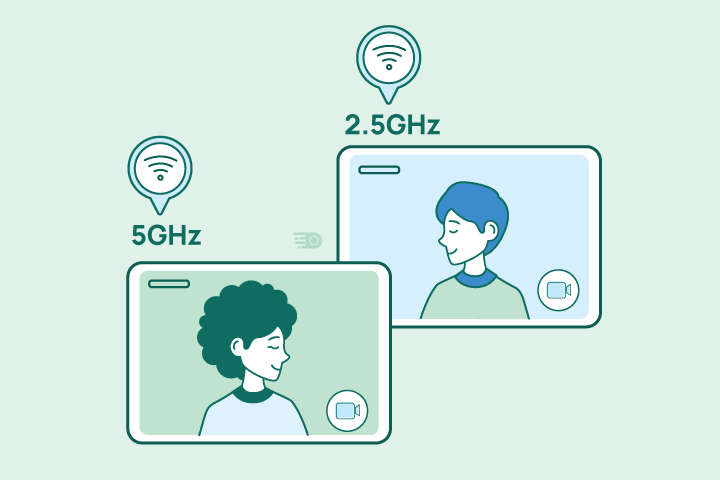
2.4Ghz vs 5Ghz graphic

7. Switch to a Different WiFi Channel

WiFi routers can broadcast their signals to a range of channels. Most countries have a few non-overlapping channels (like 1, 6, and 11), but most users leave their router set on the default channel – usually channel 1 or 6. This results in what you call “WiFi traffic jams,” where too many people try to utilize the same channel. To solve this issue, look up which channel is the least used in your area using the assistance of NetSpot. When you’ve found the right channel, connect your WiFi router to it by logging in and navigating to the settings.

person calling their ISP

8. Contact Your Internet Provider

If you’re not happy with your current WiFi performance, consider reaching out to your internet service provider to ask for their help. Oftentimes, they can diagnose the root cause of your WiFi issues to help troubleshoot. From there, your representative will tell you how to solve the issue or send a technician to fix the problem. If you find that your provider offers limited service, it may be time to switch internet service providers.

plugs

9. Regularly Reboot Your Equipment

You know that old piece of IT advice: “If it doesn’t work, turn it off and on again?” It turns out that advice also applies to WiFi routers. A quick reboot is a simple fix that can often improve WiFi speed and strength by clearing the device’s memory and installing necessary updates. Additionally, running a wifi speed test before and after a reboot can help determine the efficacy of this solution. To reboot, users can press the restart button on their router or disconnect the router from the power source, wait for 30 seconds, and reconnect it.

speed test graphic

10. Connect High-Bandwidth Devices via Ethernet

Many people often forget that ethernet exists and can be beneficial. Establishing a wired connection to your router can provide better internet performance than WiFi since it tends to be much faster and more stable. However, this does limit where your devices can be and how much you can move them, making ethernet a slightly less convenient choice.

smart devices in a row

11. Turn Off Devices and Apps You’re Not Using 

Having several unnecessary devices and apps tapping into your WiFi signal all at once can strain your router significantly, limiting its overall speed, power, and range. Always be sure to close or disconnect devices you aren’t actively using. This will allow everything you are actively using full access to your WiFi’s power. In short, always be sure that the things that actively need the internet at any given moment are the only things using the internet.

For more information on all of your internet-related needs and how to select the best internet providers, don’t hesitate to explore the Resource Center

12. Implement Advanced Router Features

Explore your router’s advanced features such as Beamforming and MU-MIMO (Multi-User, Multiple Input, Multiple Output). These technologies enhance signal strength and reliability, especially in environments with several connected devices.

13. Create a Dedicated Workspace Network

If your router allows, set up a separate guest network exclusively for your work devices. This segregation can help prioritize your work-related internet use and reduce bandwidth competition from other household devices.

14. Use Network Analyzers for Optimization

Employ network analyzing tools like Wi-Fi Analyzer or inSSIDer to identify signal strength throughout your home and adjust your setup accordingly. These tools can help you pinpoint dead zones or areas of interference.

15. Explore Powerline Networking Kits

In situations where Wi-Fi extenders aren’t enough, consider using a powerline networking kit. These kits use your home’s electrical wiring to create a wired network connection, providing an alternative when traditional Wi-Fi fails to reach certain areas.

16. Optimize for Video Conferencing and Large File Transfers

For remote workers who frequently engage in video conferencing or need to transfer large files, prioritize these activities in your router’s settings or via a Quality of Service (QoS) feature to ensure stable and fast connections for critical work tasks.


Maximize Your Work-from-Home Efficiency with the Right Internet Plan

Remember, while these tips can significantly improve your WiFi experience, sometimes the root of the problem lies beyond your router and network settings. If you’ve exhausted all these options and still struggle with unreliable internet, it might be time to explore faster and more robust internet plans available in your area.

Don’t settle for lagging connections and frustrating interruptions that hinder your productivity. Invest in a reliable internet service that empowers your remote work and elevates your professional game. Research your internet options, compare plans, and consider an upgrade that unlocks the true potential of your remote work setup.

Nick Welch
Nick has spent years navigating the ever-evolving terrain of the telecom and privacy security space, leveraging his extensive knowledge to create insightful content that addresses common internet-related queries and challenges. Away from work, Nick enjoys spending time outdoors with family and his dog. On weekends you can find him hiking local trails or taking on new running routes.

2.4 vs 5 GHz WiFi: What’s the Difference

HighSpeedOptions prides itself on providing honest, quality content. While we may be compensated when you make a purchase through links on our site, all opinions are our own. Here's how we make money.

Are you having issues with your WiFi? If you’re experiencing connectivity issues, consider running a wifi speed test and try switching up the way you access your home network on different devices. Before contacting your internet providers, try switching frequency bands.

Most routers today have dual-band technology that allows users to switch between 2.4 GHz and 5 GHz frequency bands, which can increase internet speed. We explain the main differences between the two bands to help you know what scenarios each works best for.

Need faster WiFi? WiFi 6 is here and promises huge speed gains.

internet graphic

Interference and Wi-Fi Channels

One important aspect to consider, especially for 2.4 GHz Wi-Fi, is the potential for interference. This band is more susceptible to interference from other household devices like microwaves and cordless phones. Additionally, within the 2.4 GHz band, there are multiple channels, and your router selects one automatically. If neighboring routers use the same channel, it can lead to interference and a weaker signal. Switching channels might help improve your Wi-Fi performance, especially in densely populated areas like apartment buildings.

Differences Between 2.4 GHz and 5 GHz

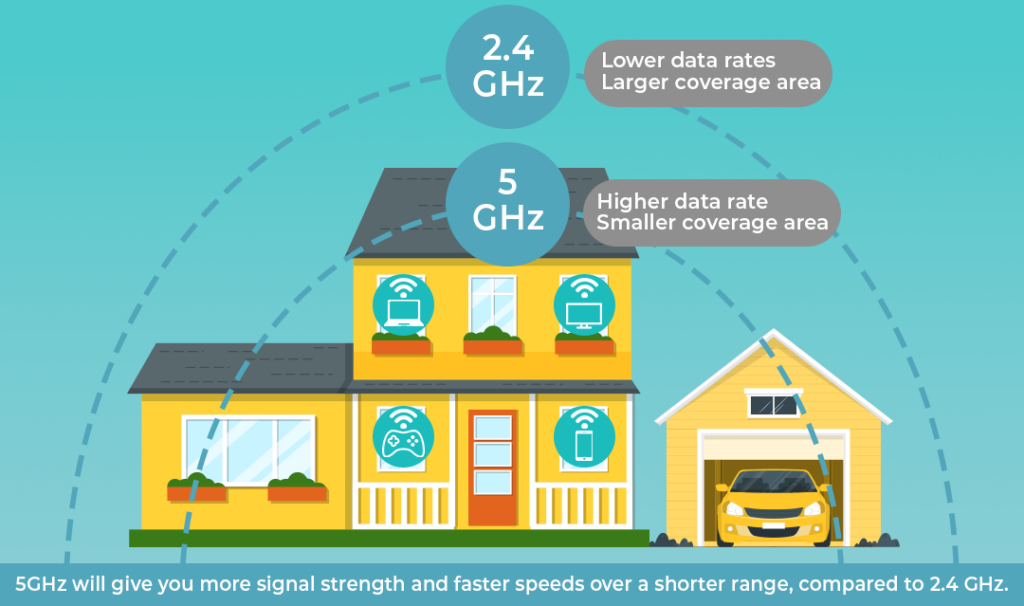
If you have a wireless router (802.11n or newer), chances are it supports two separate radio frequency bands: 2.4 GHz and 5. GHz. The main distinctions between these two bands comes down to wireless range and network speed.

Each band has strengths and weaknesses, which we explain in detail below.

2.4 GHz vs 5 GHz WiFi comparison infographic

GHz and Network Generations

WiFi networks use radio signals in different frequency lengths (i.e 2.4 GHz) to transmit data between routers and smart devices.

Depending on your internet service provider network, there are different standards, or “generations,” of WiFi technology that support faster speeds. In order of release, existing standards include:

  • 802.11b (WiFi 1)
  • 802.11a (WiFi 2)
  • 802.11g (WiFi 3)
  • 802.11n (WiFi 4)
  • 802.11ac (WiFi 5)
  • 802.11ax (WiFi 6)

Many assume a 5 GHz network performs better because it’s a “newer technology.” But this is a myth. Both 5GHz and 2.4 GHz networks were certified in 1999. However, it wasn’t until 2013 that WiFi became popular thanks to the release of WiFi 5 (i.e. 802.11ac). This network standard uses dual-band wireless technology to support simultaneous connections on both 2.4 GHz and 5 GHz bands. 

GHz and Network Speed

The first key differentiator of the two bands is network speed. A 5 GHz network can carry almost twice as much data per unit of time as a 2.4 GHz network, which makes it faster.

To put it another way, the wavelengths of a 5 GHz frequency band are half the length of a 2.4 GHz frequency band, allowing it to carry more data over shorter distances.

For this reason, devices that require more bandwidth, like gaming consoles and streaming plugins, typically run faster on 5 GHz networks. Conversely, home devices like smart appliances and phones that don’t require as much bandwidth, work just fine on 2.4 GHz networks.

GHz and Network Range

The second key differentiator of the two is network range. A 5 GHz network generally supports faster speeds, but by design, it cannot reach as far as a 2.4 GHz signal. The higher the frequency of the wireless signal, the shorter its range. Therefore, a 2.4 GHz network usually covers a larger surface area than 5 GHz does.

In addition, 5 GHz wavelengths are more prone to collide with other objects (i.e. furniture, walls, etc.), which interferes with its signal. In contrast, 2.4 GHz wavelengths travel farther distances and can penetrate solid objects.

For this reason, a 5 GHz network is better suited for stationary devices like TVs and gaming consoles that don’t require much range, while a 2.4 GHz network works best with phones, alarm systems, and smaller devices that don’t require much bandwidth.

Optimizing Router Settings for Different Bands

To maximize your Wi-Fi experience, consider optimizing your router settings. For 2.4 GHz, selecting a less crowded channel can significantly reduce interference. For 5 GHz, ensure your router is positioned in a central location to maximize its shorter range. Most modern routers offer settings that can help you optimize each band based on your usage and environment.

Choosing Between Bands

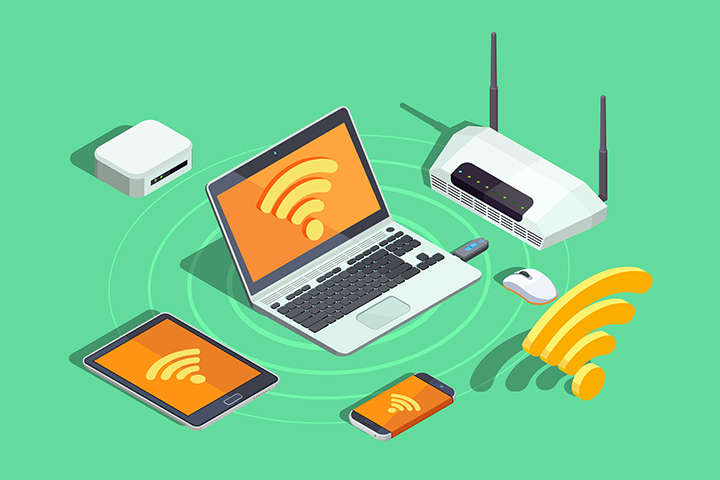
connected devices illustration

In general, what one band excels at the other one lacks, and vice versa. So, the question isn’t, “Which one is better?” The question is, “When should I use them?” We outline a few things to consider when choosing between wireless bands.

1. Size of your home

As we discussed above, the higher the frequency of a network, the shorter its range. So, larger households (usually 1,500 sq. ft. or bigger) tend to benefit from a 2.4 GHz band since they require a greater coverage area. On the other hand, if you live in a smaller home or apartment, 5GHz will deliver faster speeds and eliminate dead spots with ease in most instances.

2. Types of devices

Ideally, you want to use the 2.4 GHz band for devices that require low bandwidth, like smartphones, home security systems, and garage openers. On the other hand, if you stream videos on an Amazon Firestick or have a gaming console, 5 GHz supports high-bandwidth devices best.

3. How devices are being used

Similarly, you’ll want to consider what you’re using your devices for. Certain online activities likie streaming movies can generate and consume more bandwidth than others, regardless of whether you’re on a desktop computer or your smartphone. For example, if you use your phone to check emails, connected to a 2.4 GHz network will suffice. However, using your phone to stream YouTube videos will require more bandwidth, which a 5 GHz network is best for.

How to change frequency settings

Now that you’ve determined which frequency is right for you based on our suggestions above, it’s time to get down to actually using that frequency. Or maybe you’d like to change frequencies depending on your activity or device. Either way, your first step should be to enable wireless connection on your modem and router. 

A dual-band router will keep both frequencies up at the same time. When you try to access your WiFi, you’ll see two networks (SSIDs) with the same name on your local networks list. The only difference will be “5G” or “2.4G” behind the Wifi name.  

When selecting a WiFi for each device, you can decide which frequency to choose based on those networks: 5G for 5 GHz or 2.4G for 2.4 GHz.  

WiFi 6E, WiFi 7, and emerging frequencies

While 5 GHz and 2.4 GHz remain the most widely available frequencies, with new emerging technology, some WiFi 6E and WiFi 7 devices are equipped to provide 6 GHz frequencies.  

A 6 GHz frequency band is more than double the size of 2.4 GHz and 5 GHz and supports up to seven channels. As a result, 6 GHz can provide faster speeds, better performance, enhanced capacity for more devices, and reduce common WiFi interference.  

Key Takeaway

All in all, choosing which band to use really depends on the situation. 2.4 GHz and 5 GHz networks each have their own advantages, and it’s important to take into account multiple factors like your home size, devices, and online activity when determining the right solution for you.

The best part about having a dual-band router is that you can also divvy up bandwidth, connecting different devices to both bands simultaneously. This helps reduce possible network congestion overall.

That said, if you still experience problems with your WiFi connection, you may want to also consider boosting your signal with WiFi extenders or upgrading your internet plan to include higher speeds.

Nick Welch
Nick has spent years navigating the ever-evolving terrain of the telecom and privacy security space, leveraging his extensive knowledge to create insightful content that addresses common internet-related queries and challenges. Away from work, Nick enjoys spending time outdoors with family and his dog. On weekends you can find him hiking local trails or taking on new running routes.

Best Black Friday & Cyber Monday Internet Deals 2025

HighSpeedOptions prides itself on providing honest, quality content. While we may be compensated when you make a purchase through links on our site, all opinions are our own. Here's how we make money.

Autumn savings are here! With leaves falling and the holidays approaching, internet providers are unveiling their hottest Black Friday and Cyber Monday deals. Now is the perfect time to upgrade your home’s connectivity. Fiber, cable, and satellite internet companies are slashing prices for a limited time. Lock in blazing fast speeds and reliable service for less this season.

Note: Promotions and offers are subject to change. Call our agents today for the best deals on internet service in your area.

Call today. One of our agents can find the best internet deals in your area.

internet graphic

EarthLink offers high-speed internet services to 48 states, with blazing fast fiber optic connectivity reaching speeds up to 5Gbps in select markets. Get started today with 50% off Wireless Home Internet introductory fees, no promo code required. With EarthLink, you’ll receive reliable high-performance internet, responsive customer support, and flexible bundling options for your home network needs.

  • Best internet protection
  • Unlimited data included
  • No credit checks

HughesNet

One of the best aspects of HughesNet satellite internet is that it is available in 99% of the U.S. Right now, HughesNet is offering free standard installation*. This is a great deal, as sometimes installing satellite internet can be tricky and time-consuming, and we always advise having professionals handle the installation.

HughesNet is offering a $100 Prepaid MasterCard to new subscribers. So, if you’re a new HughesNet customer, take advantage of this offer sooner rather than later, as it is a limited-time offer.

If you are a new satellite internet subscriber, be sure to have a look at our satellite dish maintenance tips and how to improve your satellite internet connection.

  • Satellite internet
  • 2-year fixed pricing
  • No hard data caps

Xfinity

Xfinity is one of the largest internet providers in the U.S. It provides an assortment of plans and packages and almost always has a deal going to help you get more and spend less. More often than not, their deals are focused on mobile plans. Depending on which Xfinity internet plan you choose, you can save up to $30 per month when you add Xfinity mobile service.

  • Same-day installations
  • 8+ million free WiFi hotspots
  • Unlimited data available

AT&T

AT&T is offering online promotions again this year for its fiber internet plans. If you qualify, you are eligible for up to a $200 AT&T VISA® Reward Card depending on the fiber plan you choose*. Additional savings with AT&T are available when you bundle services with a mobile plan.

*This offer is limited to AT&T fiber plans and only for new residential fiber customers.

  • Variety of plans
  • Wide availability
  • Fiber internet speeds

Spectrum

Spectrum is promoting its Spectrum One package that offers additional savings when applied to any Spectrum internet plan. Spectrum One adds advanced WiFi and one free mobile line to internet plans, with a starting price of $49.99 per month. Add in cable TV service and home phone for potentially increased savings.

  • Contract buyouts up to $500
  • Free access to WiFi hotspots
  • Nationwide availability

Kinetic by Windstream

Kinetic by Windstream is currently running an excellent promotion on its Kinetic internet service. New customers are eligible to receive a $100 VISA prepaid card, while new fiber internet customers are elible for a $200 VISA prepaid card. Restrictions apply and offers are subject to change.

  • Unlimited data
  • Rural availability
  • Free installations

Optimum

Optimum is offering a $200 prepaid card, free installation, and $10 off the first month for new internet customers. Enjoy fast, reliable fiber internet with one of Optimum’s best deals. Restrictions apply and are subject to the availability of Optimum internet services in your area.

  • Reliable internet connection
  • Cable & fiber options
  • Fixed pricing available

For all deals and promotions: Pricing, speeds, offers, and availability vary by service address and are subject to change at any time. Additional fees, taxes, and terms may apply. As of 9/1/23.

Don’t let these limited-time Black Friday and Cyber Monday internet deals pass you by. Upgrade now to enjoy faster speeds for gaming, streaming, and working from home. Offset your holiday spending with play to earn apps like Cosmic Rewards, where you can earn retail gift cards just by playing games. Use your Amazon, Target or Walmart earnings to cover the cost of routers and equipment for your new broadband service.

Keith Carlson
Written By
Keith Carlson
Written By
Keith Carlson
Keith is a Contributing Writer for HighSpeedOptions with a background in writing, SEO, GEO, and marketing. He has written for and contributed to organizations in the non-profit, financial, and enterprise internet and cable service industries. At HighSpeedOptions, Keith covers everything from broadband news to emerging technologies and how they complement different lifestyles and budgetary needs. In his free time, Keith enjoys spending time with his family, reading as many books as he can, and photography.

Mobile Gaming: Using Your Phone as a Hotspot

HighSpeedOptions prides itself on providing honest, quality content. While we may be compensated when you make a purchase through links on our site, all opinions are our own. Here's how we make money.

Mobile gaming has exploded in popularity thanks to addicting phone apps like Fortnite, Cosmic Rewards, and Minecraft. Whether you’re waiting at the doctor’s office or stuck on a long flight, mobile games help pass the time. But to play multiplayer matches and stay connected on the go, you’ll need mobile internet. 

Using your phone as a Wi-Fi hotspot is a convenient and affordable way to access data for nonstop gaming everywhere. Let’s explore how phone hotspots keep you gaming on mobile apps while traveling.

We Make Finding Internet Providers Easy

internet graphic

Turn Your Phone Into a Hotspot

Most modern Android and iOS devices can function as Wi-Fi hotspots for other gadgets like tablets and handheld gaming devices. Here’s how to enable the hotspot feature: 

For iPhone Users:

  • Access Settings:
    • Unlock your iPhone and locate the “Settings” icon, usually depicted as gears.
    • Tap on the “Settings” icon to open the settings menu.
  • Navigate to Personal Hotspot:
    • Scroll down through the settings options until you find “Personal Hotspot.”
    • Tap on “Personal Hotspot” to access the hotspot settings.
  • Activate Hotspot:
    • You will see a toggle next to “Allow Others to Join.”
    • Slide the toggle to the right; it will turn green indicating that the hotspot feature is now active.
  • Connect Devices:
    • On the device you wish to connect, open the Wi-Fi settings.
    • Look for your iPhone’s name in the list of available networks, tap on it, and enter the password (if you have set one) to connect.

For Android Users: 

  • Access Settings:
    • Unlock your Android device and locate the “Settings” icon, often represented by a gear.
    • Tap on the “Settings” icon to enter the settings menu.
  • Navigate to Hotspot & Tethering:
    • Within the settings menu, tap on “Network & Internet” to explore the network settings.
    • Find and tap on “Hotspot & Tethering” to access the hotspot settings.
  • Active Hotspot:
    • Locate the option for “Wi-Fi hotspot” and tap on it.
    • Toggle the switch at the top to turn on the Wi-Fi hotspot feature.
  • Configure Hotspot (Optional):
    • Within the Wi-Fi hotspot settings, you can configure the network name, password, and other settings as per your preference.
  • Connect Devices:
    • On the device you wish to connect, open the Wi-Fi settings.
    • Look for your Android device’s name in the list of available networks, tap on it, and enter the password (if you have set one) to connect.

After you’ve turned on the hotspot, connect your other devices to your phone’s Wi-Fi network as you would any router. Then launch your favorite mobile game apps and play anywhere.

Best Games for Mobile Gaming

Today’s most popular mobile titles require an internet connection for crucial features like multiplayer battles, live events, cloud syncing and more. The key is an uninterrupted internet connection, which phone hotspots provide on the go.

Here are some great mobile games that showcase innovative uses of persistent online connectivity:

GenreGame 1Game 2Game 3
Rewarded PlayCosmic RewardsMist PlayAlpha
ActionFortniteState of SurvivalCall of Duty Mobile
RPGPokemon UNITEDiablo ImmortalEvertale
CasualRobloxMario Kart TourMinecraft
StrategyClash RoyaleSolitaire CashAuto Chess
GenreRewarded Play
Game 1Cosmic Rewards
Game 2Mist Play
Game 3Alpha
GenreAction
Game 1Fortnite
Game 2State of Survival
Game 3Call of Duty Mobile
GenreRPG
Game 1Pokemon UNITE
Game 2Diablo Immortal
Game 3Evertale
GenreCasual
Game 1Roblox
Game 2Mario Kart Tour
Game 3Minecraft
GenreStrategy
Game 1Clash Royale
Game 2Solitaire Cash
Game 3Auto Chess

Consider Mobile Data Usage

Streaming and real-time online play eats up data quickly. While unlimited plans give you peace of mind, most hotspot allowances on unlimited data plans range between 30-50GB. Monitor your usage to avoid reduced mobile gaming speeds.

For lighter mobile gaming, smaller data plans around 5-15GB are often sufficient. Wi-Fi assists mode in some games leverages Wi-Fi whenever available to conserve mobile data.

Bundling Internet & TV Can Save You Money

internet graphic

Have Fun Gaming On the Go

Mobile hotspots are not only convenient for gaming, but they can also be used for a variety of other tasks, such as working remotely, streaming videos, and downloading files. They are also relatively affordable, and most major mobile carriers offer hotspot plans.

If you are looking for a way to stay connected and entertained on the go, a mobile hotspot is a great option. With a mobile hotspot, you can enjoy your favorite games and other online activities without having to worry about finding a reliable Wi-Fi connection.

Written By
Nick Welch
Written By
Nick Welch

Rural Internet Options [Guide]

HighSpeedOptions prides itself on providing honest, quality content. While we may be compensated when you make a purchase through links on our site, all opinions are our own. Here's how we make money.

While living in the country might be slower-paced than in the city, that doesn’t mean your internet service has to be, too. Finding and comparing rural internet options can be difficult, but not impossible.

If you’re looking for rural internet options that can support your streaming apps and home office, this guide is for you. We break down various aspects of rural internet including the different internet connection types available, the top rural internet providers, features to look out for, and what the future holds for rural internet as a whole.

Top Rural Internet Providers

Put dial-up out to pasture with these fast rural internet providers offering high-speed plans that won’t break the bank. Below we list top ISPs and their best deals to help you gauge what’s out there.
Rural ProviderStarting Price*Download Speed Up To*Type
FrontierLess than $50/mo.**Varies by locationDSL
HughesNet$59.99/mo.25 MbpsSatellite
Viasat $64.99/mo.150 MbpsSatellite
AT&T$45.00/mo.100 MbpsDSL
Rise Broadband$35.00/mo.25 MbpsFixed-Wireless
Windstream$37.00/mo.100 MbpsDSL
*Prices and plans vary by location, do not include additional fees, and are subject to change at the discretion of the providers. Speeds vary by location and are not available everywhere. Data sourced 11/23/21.
**Frontier Internet Offer Details: For new residential Frontier Internet customers. Requires Auto Pay or $5/mo fee applies. Effective January 2022, paper bill extra $2.99/mo, NY and select customers excluded. Max speeds are wired. Wi-Fi, actual & average speeds vary. Performance details: frontier.com/internetdisclosures. Activation ($85) and other applicable charges, add’l services and taxes are extra & subject to change during & after the promo period. A $10 fee applies when Internet is disconnected. Equipment return required at disconnection, up to $100 per device if not returned. Service subject to availability. Cannot be combined with other offers. Other restrictions, Frontier policies and service terms apply.
Rural ProviderFrontier
Starting Price*Less than $50/mo.**
Download Speed Up To*Varies by location
TypeDSL
Rural ProviderHughesNet
Starting Price*$59.99/mo.
Download Speed Up To*25 Mbps
TypeSatellite
Rural ProviderViasat 
Starting Price*$64.99/mo.
Download Speed Up To*150 Mbps
TypeSatellite
Rural ProviderAT&T
Starting Price*$45.00/mo.
Download Speed Up To*100 Mbps
TypeDSL
Rural ProviderRise Broadband
Starting Price*$35.00/mo.
Download Speed Up To*25 Mbps
TypeFixed-Wireless
Rural ProviderWindstream
Starting Price*$37.00/mo.
Download Speed Up To*100 Mbps
TypeDSL
*Prices and plans vary by location, do not include additional fees, and are subject to change at the discretion of the providers. Speeds vary by location and are not available everywhere. Data sourced 11/23/21.**Frontier Internet Offer Details: For new residential Frontier Internet customers. Requires Auto Pay or $5/mo fee applies. Effective January 2022, paper bill extra $2.99/mo, NY and select customers excluded. Max speeds are wired. Wi-Fi, actual & average speeds vary. Performance details: frontier.com/internetdisclosures. Activation ($85) and other applicable charges, add’l services and taxes are extra & subject to change during & after the promo period. A $10 fee applies when Internet is disconnected. Equipment return required at disconnection, up to $100 per device if not returned. Service subject to availability. Cannot be combined with other offers. Other restrictions, Frontier policies and service terms apply.

Rural Internet Connection Types

In rural areas, you probably have more options than you think. According to the Federal Communications Commission (FCC), over 99% of people in the US have access to at least 2 providers near them. The four most common rural connections include DSL, satellite internet, fixed-wireless, or dial-up. 

So, which rural internet option is the best? That depends on a number of factors like your location, your data usage habits, and your budget. Below, we compare the different types of rural internet service to help you decide.

dsl internet icon

DSL

Similar to fiber internet and cable internet, DSL uses pre-existing cable lines to deliver internet service to homes – specifically phone lines. If you have phone lines to your home, you most likely have access to DSL internet service. In rural areas, DSL is preferred over satellite and fixed wireless internet because of its faster speeds and protection against harsh weather. There are a handful of nationwide DSL providers that offer affordable and fast plans including Frontier, AT&T, and CenturyLink.

satellite internet icon

Satellite

Satellite internet is a great option for rural and remote areas because it’s available virtually anywhere. In the past, satellite plans came with data caps, high latency (delay), and high price tags. However, providers like HughesNet, Viasat, and most recently Starlink now offer competitive rates and unlimited data to meet users’ needs. Today, satellite internet speeds can range from 12 Mbps to 100 Mbps, but that’s anticipated to increase with the introduction of low-Earth orbit satellites.

WiFi signal icon

Fixed Wireless

Like satellite internet, fixed wireless uses a dish or antenna to receive internet. It broadcasts a signal from a fixed cell tower to surrounding areas and can deliver speeds up to 1000 Mbps in certain areas. It’s less common than other wireless connections, but those that can access it benefit from lower latency and decent data rates, making gaming possible in rural areas. Fixed wireless internet providers are also usually local ISPs, which means you can support a small business right within your community.

cable internet icon

Dial-Up

Yes, dial-up is still around. And if you live in a remote area, it very well could be your own option. It’s a decent and cheap internet connection if you plan to live an unplugged lifestyle that needs only check emails or browse the web. Similar to DSL internet, dial-up internet utilizes telephone lines to deliver service to homes. However, dial-up speeds are usually less than 1 Mbps, making it the very last option we’d recommend going with.

Best Satellite Service: HughesNet

  • Satellite internet
  • 2-year fixed pricing
  • No hard data caps

While satellite internet is available almost anywhere, it’s usually the last resort for rural households. Satellite tends to be slower than DSL and fixed wireless and more expensive in the long run. However, if your options are limited, HughesNet is a reliable satellite provider worth exploring. It has no hard data caps and offers promotional pricing for the first three months of service for instant savings.

thumb_upPros

  • check_circle

    50 GB/mo. bonus data for off-peak hours (2 am-8 am)

  • check_circle

    Cheaper than Viasat for same Mbps

  • check_circle

    Built-in WiFi for greater home coverage

  • check_circle

    No hard data caps

thumb_downCons

  • cancel

    Low upload speeds

  • cancel

    Difficult connection for gamers

  • cancel

    Promotional price increases after first 6 months

Best DSL Service: Frontier

  • Fiber & DSL provider
  • WiFi router included
  • Unlimited data included

DSL internet uses home phone lines to deliver internet service to customers. While typically much slower than fiber and cable connections, DSL is preferred over satellite and fixed wireless internet in rural areas for its speeds and protection against inclement weather. Frontier internet in particular offers some of the fastest DSL plans with decent download speeds and unlimited data.

thumb_upPros

  • check_circle

    Free equipment rentals

  • check_circle

    No contracts required

  • check_circle

    No hard data caps

thumb_downCons

  • cancel

    Limited DSL availability

  • cancel

    $85 installation fee

Best Fixed Wireless Service: Rise Broadband

  • Simplified pricing
  • Unlimited data included
  • No annual contract required

Rise Broadband offers fixed-wireless internet plans with speeds ranging from 25 Mbps to 50 Mbps that can support light usage. Fixed-wireless internet service is not only easier to install than fiber and DSL that require lining wire to a home, but it also allows for quick repairs as well.

thumb_upPros

  • check_circle

    Unlimited data available for extra $10 per month

  • check_circle

    Easy setup for new homes

  • check_circle

    Affordable pricing

thumb_downCons

  • cancel

    Occasional signal interference due to weather

  • cancel

    Data limit of 250 GB per month

Features to Look Out For

graphic of internet fee icons

Now that you have a better idea of what rural options are out there, it’s time to sift through providers. Along with your personal needs, you’ll want to keep these key features in mind when making your final decision.

Speeds

It’s tempting to want the best plan your ISP offers, but more times than not, you may need less than you think. The FCC recommends speeds between 1 Mbps and 8 Mbps for common internet activities like web browsing, streaming video, teleconferencing, and online gaming. Most rural internet providers offer at least 25 Mbps download speeds, which should support most of these everyday tasks.

Price

The last thing you want is to receive a bill in the mail that you weren’t expecting. When it comes to ISPs, you want to read the fine print to avoid any surprises. Oftentimes, they’ll sucker you in with a sweet promotional deal, only to hike the price up a few months or a year later.

Data Limits

Data limits can quickly kill the mood when they’re not enough. Before signing up for an internet plan, make sure they offer enough bandwidth to support your personal usage habits. Otherwise, you may find yourself unhappy with your provider at the onset. Most rural internet providers these days either include unlimited data in their plans or give customers the option to upgrade for an added fee.

Hidden Fees

An internet provider might have low introductory rates on internet plans, but that usually doesn’t include upfront costs like installation, activation fees, and equipment rentals. Be sure to look for the extra fees associated with your plan before signing on the dotted line.

Future of Rural Internet

The current state of the internet still leaves a lot to be desired, but there is much to look forward to in the coming years – especially as it relates to rural internet. Rural internet is where some of the most exciting developments in internet technology are happening. From mobile broadcast towers to low-Earth orbit satellites, new advancements are being made every day. And, common internet myths are being debunked along with them.

For example, one myth many people believe is that “satellite is on its last leg.” The reality is actually quite the opposite. Companies like SpaceX and Amazon are investing billions of dollars into low-Earth satellite systems to bring faster and cheaper rural internet options to millions of Americans.

As of early 2021, the Starlink Beta program powered by SpaceX is in testing phases throughout the US. Starlink internet utilizes new satellite technology that has the potential to deliver speeds of up to 1000 Mbps and latency as low as 20 ms. Not to mention, with satellite internet available virtually everywhere, this has the potential to significantly reduce the digital divide.

In addition, the continuing rollout of 5G could lead to better fixed wireless connections in rural areas, improving download speeds and increasing data limits for internet customers. So don’t give up on your home internet experience just yet. If you’re still looking for better service where you live, know that the future is bright for rural internet options.

FAQ

Rural Internet FAQs

Yes. Satellite, DSL, and fixed wireless internet are the most common connections types found in rural areas. Satellite is typically the go-to choice for rural households, as it’s available nearly everywhere in the United States. DSL is another great option if you’re looking for fast internet with higher monthly data allowances.

Enter your zip code here to find providers available in your area.

There are multiple government programs available for rural residents in need of affordable internet service. For example, the Lifeline program helps low-income households get communications services including internet and phone. The Emergency Broadband Benefit is another program that helps households affected by the COVID-19 pandemic, low-income families, and students pay for internet costs.

See what other government assistance programs are available right now that may help you get cheap or free internet service.

The first option most people consider is changing their rural internet provider. However, there are a handful of tricks we recommend trying before you might resolve to switch internet providers. Here’s an infographic of the top 10 reasons for slow internet and how to fix them.

If you find that your slow internet speed is, in fact, related to your connection type, then it’s probably time to consider all your options. DSL and dial-up internet service tend to be the slowest connections, so switching to a fixed wireless or satellite internet provider may offer faster speeds.

Both satellite and fixed wireless internet are good options for rural households. Satellite internet is generally better than fixed wireless because it offers more availability and faster speeds. However, fixed wireless service tends to produce lower latency than satellite due to the shorter distance signal has to travel.

It mostly comes down to cost and time. Rural internet tends to be slower than urban internet because ISPs choose to focus their attention and resources on areas with dense populations. It’s more profitable to service a smaller area with more people, which means rural areas often get shorted on the latest technology.

In addition, it takes substantial time and money to build out networks in rural areas where the terrain is often harsher and less developed than in the city. Grounded internet connections like fiber, cable, and DSL face geographical barriers that satellite can overcome easier.

There are currently two major satellite internet providers: Viasat and HughesNet. However, many new companies are attempting to compete in the market. The main one among them is Starlink, which is developing a new satellite constellation that flies at low orbit to deliver faster speeds.

Paula Novo
Written By
Paula Novo
Written By
Paula Novo
With over four years of telecom experience, Paula Novo is the Site Editor for HighSpeedOptions. She has helped develop the criteria by which HighSpeedOptions reviews and recommends internet service providers. Paula also leads HighSpeedOptions' coverage of the digital divide, broadband policy, and ISP reviews.

Best Rural Internet for Streaming Video

HighSpeedOptions prides itself on providing honest, quality content. While we may be compensated when you make a purchase through links on our site, all opinions are our own. Here's how we make money.

Even if you live in a remote area, rural internet options are available to give you access to the internet speeds you need to stream your favorite content. Here’s a look at the best rural internet options for streaming video and how to optimize your internet connection type to make the most of it.

Types of Rural Internet Suitable for Streaming

Satellite Internet

While not on par with fiber internet or cable internet, satellite internet has improved in the last 5-10 years. Providers like HughesNet and Viasat have been providing decent speeds capable of streaming video content, and Starlink continues to improve its satellite network, resulting in increased speeds and better internet latency. Given that satellite internet is available nearly nationwide, it’s a particularly good option if you live in the country.

  • Fast satellite internet
  • Ideal for rural areas
  • Up to 3x faster than DSL*
  • Satellite internet
  • 2-year fixed pricing
  • No hard data caps

Fixed Wireless Internet

Fixed wireless internet is a solution that works by receiving signals from a nearby tower, similar to how cell phones work but designed for home internet. It is less common than the other types listed here, but providers like Rise Broadband and Starry offer attractive plans. Fixed wireless is effective in areas where the geographical layout might make cable infrastructure impractical and has limited elevation relief and obstructions.

  • Fast speeds in rural areas
  • Affordable prices
  • Quick installations
  • 5G Fixed Wireless Provider
  • Contract buyout up to $200
  • Pause or cancel anytime for free

DSL (Digital Subscriber Line)

Although it’s one of the older technologies, DSL internet can still offer decent speeds for streaming. You’ll commonly find EarthLink, CenturyLink, and Frontier in many rural areas. Keep in mind, though, that your overall speed will decrease the further you are from the provider’s network hub.

  • Best internet protection
  • Unlimited data included
  • No credit checks
  • Simplified pricing
  • Unlimited data included
  • No annual contract required

5G Home Internet

Mobile providers are expanding and offering 5G networks in more areas every day. While 5G internet is predominantly urban, its rapid expansion and the robustness of 4G in many rural areas make this a viable option for streaming. It’s not the most ideal solution, especially if you’re not close to a tower, but it’s a reliable internet option if it’s the only one in your area.

  • Variety of plans
  • Wide availability
  • Fiber internet speeds
  • Fast symmetrical speeds
  • Fiber-optics network
  • No annual contracts

Rural Internet Considerations for Streaming Video

Ideally, streaming video works best over a high-speed, low-latency internet connection. Fiber and cable internet are ideal for these reasons but are scarce in rural areas. As you search for rural internet solutions for streaming, keep the following in mind:

Speed

Speed is of the essence. For SD quality, you’ll need at least 3 Mbps. For HD quality, 5-8 Mbps is recommended. And for ultra HD or 4K, you’ll need upwards of 25 Mbps. Always opt for a little more than the minimum to account for other devices and activities.

Consistency

A stable connection is crucial. Sporadic drops or inconsistent speeds can disrupt streaming and lead to buffering. Which leads to a frustrating streaming experience. 

Data Allowance

Streaming consumes a lot of data. Some rural internet options come with data caps. For regular streamers, it’s crucial to choose a plan with a high internet data cap or ideally, unlimited data. When choosing the  best satellite internet, pay close attention to high-speed data allowances.

Optimizing Your Rural Internet Connection for Streaming Video

Wired Connection

Whenever possible, connect your streaming device directly to your WiFi router using an ethernet cable. This reduces potential interference and usually offers a more stable connection than Wi-Fi.

Optimize Wi-Fi

If you rely on Wi-Fi, ensure your router is in an optimal location. Centralized, elevated positions away from thick walls or electronic devices often give the best signal distribution. Regularly updating your router’s firmware and using WiFi extenders can boost performance.

Limit Other Activities

When streaming, especially in high definition, try to limit other high-bandwidth activities. This includes pausing large downloads, online gaming, or other streaming activities.

Adjust Streaming Quality

Most streaming platforms like Netflix or YouTube allow you to adjust the quality of the video. If you’re facing issues, consider dropping the quality a notch.

Use a Quality of Service (QoS) Setting

Some modern routers have a QoS setting that lets you prioritize certain types of traffic. By prioritizing your streaming service, you can ensure it gets a bigger slice of your bandwidth.

Regularly Monitor and Test

Periodically test your internet speed. This helps you ensure you’re getting the speeds you’re paying for and can identify potential issues.

Streaming video with rural internet can be challenging. Satellite, fixed wireless, 5G, and DSL internet are each capable internet connections capable of offering a decent streaming experience. But knowing what streaming video demands of your internet and some optimization tricks, you can make the most of your rural internet connection.

Keith Carlson
Written By
Keith Carlson
Written By
Keith Carlson
Keith is a Contributing Writer for HighSpeedOptions with a background in writing, SEO, GEO, and marketing. He has written for and contributed to organizations in the non-profit, financial, and enterprise internet and cable service industries. At HighSpeedOptions, Keith covers everything from broadband news to emerging technologies and how they complement different lifestyles and budgetary needs. In his free time, Keith enjoys spending time with his family, reading as many books as he can, and photography.