Best RV Internet Options 2026
HighSpeedOptions prides itself on providing honest, quality content. While we may be compensated when you make a purchase through links on our site, all opinions are our own. Here's how we make money.
Table of Contents
Traveling in an RV or van is a fantastic way to explore the world and even earn a living. In 2026, having reliable internet is essential, even when you’re on the road. Here are the latest RV internet options in 2026, best choices based on your RVing style, cost comparisons, and what you need to know to stay connected while traveling.
Key Takeaways: Internet Options for Your RV
- There’s no single best RV internet solution; the right choice depends on where you camp (RV parks vs. off-grid) and how much data you need.
- For reliability, plan on two connections, such as a cellular hotspot and satellite internet.
- Upload speed and stability matter most for work calls; streaming mainly needs a fast download speed.
- RV-park Wi-Fi is often the weakest link due to unreliability and security risks, so treat it as a backup.
- Satellite internet can be a lifesaver when you’re off the grid, but it needs a clear view of the sky and can be expensive.
Finding reliable internet on the road can be frustrating, but don’t worry—there are solutions to keep you connected.
RV Internet Options by Scenario
| Your scenario | Recommended setup | Why it works | Lookout for: |
| Weekender | Phone hotspot (or a small, dedicated hotspot) | Cheapest and simplest for light use and short trips | Data caps and throttling can hit fast if you stream a lot |
| Mostly RV parks | Wi-Fi extender as primary and a phone hotspot as backup | Extender improves park Wi-Fi reach; hotspot saves you when Wi-Fi is unusable | Park Wi-Fi is often congested at night (slow even with an extender) |
| Off-grid boondocking | LEO satellite (Starlink) and cellular hotspot or booster backup | Satellite can work where cell doesn’t; cellular can be faster when signal exists | Satellite can fail under tree cover, and needs clear sky view |
| Full-time remote work (Zoom, Teams, Meet) | Primary cellular router or hotspot and a backup connection (second carrier or LEO satellite) | Redundancy means fewer no-internet days and better uptime for calls | Relying on one network could mean work delays, outages, or dead zones |
| Budget backup | Prepaid hotspot or data plan, mostly for urgent matters | Low monthly cost, easy emergency option | Prepaid can be expensive per GB, and slow if deprioritized |
| Heavy streaming and multiple devices | Strong cellular plan and a router for in-RV Wi-Fi; optional LEO backup | Cellular often gives the best speeds when coverage is strong; router improves in-RV experience | Unlimited plans can still slow after premium data is used up |
| Your scenario | Weekender |
| Recommended setup | Phone hotspot (or a small, dedicated hotspot) |
| Why it works | Cheapest and simplest for light use and short trips |
| Lookout for: | Data caps and throttling can hit fast if you stream a lot |
| Your scenario | Mostly RV parks |
| Recommended setup | Wi-Fi extender as primary and a phone hotspot as backup |
| Why it works | Extender improves park Wi-Fi reach; hotspot saves you when Wi-Fi is unusable |
| Lookout for: | Park Wi-Fi is often congested at night (slow even with an extender) |
| Your scenario | Off-grid boondocking |
| Recommended setup | LEO satellite (Starlink) and cellular hotspot or booster backup |
| Why it works | Satellite can work where cell doesnât; cellular can be faster when signal exists |
| Lookout for: | Satellite can fail under tree cover, and needs clear sky view |
| Your scenario | Full-time remote work (Zoom, Teams, Meet) |
| Recommended setup | Primary cellular router or hotspot and a backup connection (second carrier or LEO satellite) |
| Why it works | Redundancy means fewer no-internet days and better uptime for calls |
| Lookout for: | Relying on one network could mean work delays, outages, or dead zones |
| Your scenario | Budget backup |
| Recommended setup | Prepaid hotspot or data plan, mostly for urgent matters |
| Why it works | Low monthly cost, easy emergency option |
| Lookout for: | Prepaid can be expensive per GB, and slow if deprioritized |
| Your scenario | Heavy streaming and multiple devices |
| Recommended setup | Strong cellular plan and a router for in-RV Wi-Fi; optional LEO backup |
| Why it works | Cellular often gives the best speeds when coverage is strong; router improves in-RV experience |
| Lookout for: | Unlimited plans can still slow after premium data is used up |
Pro tip: If you rely on stable internet for work or other reasons, then it can’t hurt to have two separate connections (cellular and satellite, or two different cellular networks). You can expect outages and spotty reception while on the road.


What are the Best Internet Options for RV?
RVers have a few choices for internet access. They include mobile hotspots, satellite internet, public Wi-Fi, and internet provider hotspots. Here we discuss how they work and how best to use them on the road.

Mobile Hotspots
Yes, mobile hotspots are a popular and reliable way for RVers to get online. They are useful when you find yourself far from reliable and secure public Wi-Fi sources.
One of the best mobile hotspot products is the Wireless Home Internet device from EarthLink. might be an ideal mobile solution for RVers. It was designed for rural users as an alternative to satellite internet and DSL internet. Don’t let the name confuse you; it is a portable hotspot device that works well on the road. You will need to have 120V outlets in your RV and be within a cellular network to use it, though.

- Best internet protection
- Unlimited data included
- No credit checks
EarthLink’s Wireless Home Internet at a Glance
- It accesses available LTE, 4G, and 5G networks.
- It requires 120V power and cellular coverage to use it on the road.
- It can connect multiple devices, but too many can reduce speed and performance.
Keep in mind that the provider may set data caps. If so, it may be more cost-efficient to get an unlimited plan if one is offered.

Satellite Internet
Satellite internet is becoming a favorite among RVers and digital nomads, especially with Starlink’s expanded coverage. Starlink also offers a portable satellite internet product perfectly suited for those on the road.
Starlink Roam comes in two plans: 100GB and Unlimited. As the name implies, the Unlimited plan includes unlimited internet data at a higher monthly cost. The 100GB plan costs less but has data caps. While convenient and reliable, be prepared to purchase equipment upfront for any Starlink product.

- High-speed satellite internet
- Low-latency connection
- No annual contracts

- Fast satellite internet
- Ideal for rural areas
- Up to 3x faster than DSL*

- Satellite internet
- 2-year fixed pricing
- No hard data caps

Public Wi-Fi
In most places, you’ll have access to public Wi-Fi—whether it’s in a campground, Starbucks, rest or truck stop, or a public library. Using public Wi-Fi can be a great way to save on internet costs, especially if you plan to stay in campgrounds and RV parks that offer it. Be sure to take precautions to protect your privacy and security while using a public Wi-Fi.
What are the Pros and Cons of Using Public Wi-Fi?
Pros
Generally free to use
Very common in places like campgrounds, state and national parks, and restaurants
Other than your device, there are no equipment costs
Cons
Performance can be slow and inadequate for activities such as streaming video or Zoom calls
Public WiFi networks typically have very poor internet security and privacy
Service can be throttled to accommodate more connections

Internet Provider Wi-Fi Hotspots
Many internet providers have nationwide hotspots that you can access through the service at your home address. Although they likely aren’t available in the wilderness and remote locations, they are readily available in cities and towns throughout the country, \ making them a good backup connection when they’re available.
Xfinity internet has over 22 million hotspots nationwide. It’s a sophisticated network made possible through the use of Xfinity customers’ gateways, as well as partnering internet providers. Xfinity customers can access the hotspots for free. Non-customers may need to pay a small fee for access.

- Same-day installations
- 22+ million free Wi-Fi hotspots
- Unlimited data available
How can I maximize my RV internet?
Once you have a reliable internet connection in your RV, here are a few tips to get the most out of it:
Subscribe to Unlimited Data
Spring for an unlimited data plan, even if it’s a bit more expensive. Doing so can cost less than paying for data usage above your provider’s data caps. If you know that you’ll need more than the limit allows, it’s typically less expensive per month to go with unlimited data.
Cellular Signal Booster
A cellular signal booster is a device that increases the signal strength within its proximity. They are particularly helpful on network fringes where the signal weakens. They will not work in remote areas without a cellular network signal.
What to know about cellular signal boosters for RV internet:
- They are expensive, sometimes as much as $500.
- They can cause interference and destabilize your connection if other networks or boosters are nearby.
- Check with your carrier. They may not allow boosters or use an incompatible frequency.
- Depending on the stability of the signal, a booster can quickly drain your device’s battery.
- Monitor the signal. Turn it off if the tower signal is strong enough.
Wi-Fi Extender
A Wi-Fi extender, or repeater, is another gadget that can help improve the connection in your RV when you’re using a campground or public Wi-Fi. An extender rebroadcasts the Wi-Fi signal it’s receiving to create a stronger and faster signal. Be sure to run an internet speed test afterward to gauge the performance of your internet connection.
Some RV manufacturers even integrate them into their recreational vehicle models, or are at least an option to have installed. Since Wi-Fi extenders connect to public networks, we recommend reviewing our tips on security and privacy.
How Much Does RV Internet Cost?
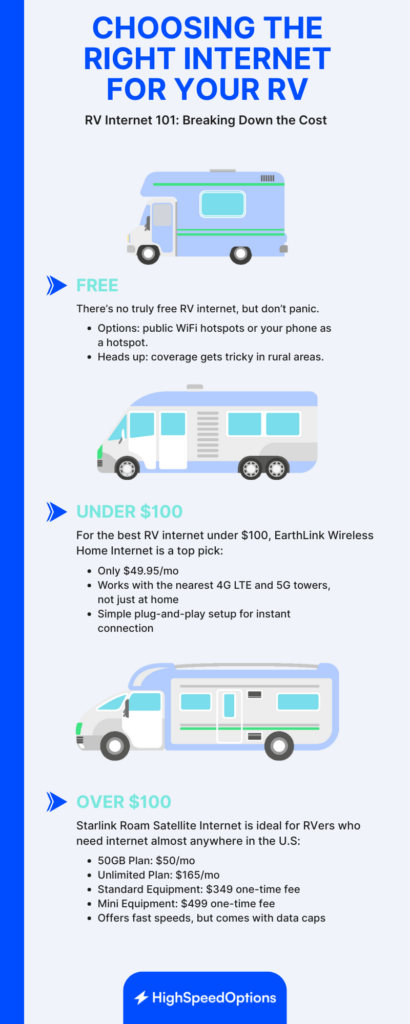
As you can probably guess, the monthly costs to get internet service while on the road in your RV vary. There’s free public Wi-Fi, somewhat costly satellite internet, and everything in between.
Free Options
- Many internet providers offer access to Wi-Fi hotspots that are widely available nationwide, except in some remote and rural locations.
- You can also use your smartphone as a hotspot to get internet access while exploring in your RV. These aren’t “free” services, but are included as part of your monthly cell service.
Under $100
- EarthLink’s Wireless Home Internet service starts at just $49.95/month. It’s an affordable option for those looking for a portable Wi-Fi device. Choose a data plan that works with your needs, plug it in, and connect to the fastest cellular signal possible in your area.
Over $100
- Starlink Roam satellite internet service for RVs is ideal for nomads and recreational vehicle owners. It’s fast and available almost anywhere in the United States, but it comes at a cost.
| Starlink Roam Satellite Service (2026) | Cost |
| 50GB Plan | $50/month |
| Unlimited Plan | $165/month |
| Standard Equipment | $349 |
| Mini Equipment | $499 |
| Starlink Roam Satellite Service (2026) | 50GB Plan |
| Cost | $50/month |
| Starlink Roam Satellite Service (2026) | Unlimited Plan |
| Cost | $165/month |
| Starlink Roam Satellite Service (2026) | Standard Equipment |
| Cost | $349 |
| Starlink Roam Satellite Service (2026) | Mini Equipment |
| Cost | $499 |
Know Before You Go: RV Internet Data Caps and Costs
Some internet providers implement data caps. This simply means that you have an allotment of “free” data to use during a month. You won’t lose service if you reach that amount, but some providers may throttle, or slow down, your internet speed once you do.
What is most important to know in this scenario is that data overage costs can be very expensive. Any type of internet service may come with data caps. The two most common are satellite internet and mobile hotspots, especially if you’re using your smartphone’s hotspot feature.
Before you begin travelling around in your RV, find out if:
- Your provider imposes data caps;
- How much data you get;
- And, what overage fees may apply.
It may be less expensive to upgrade your service to unlimited data if the option is available. And you should consider it if you know your internet lifestyle is incompatible with the data limit. Having unlimited data alleviates the concern of incurring expensive overage costs and monitoring and budgeting your usage.
How to Keep RV Internet Secure and Private
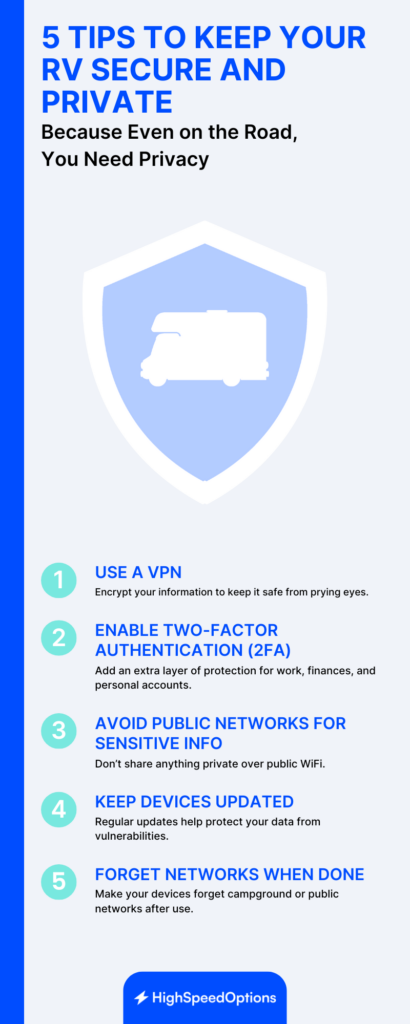
There are several ways to enhance internet security and privacy for RV. These tips help protect any connection; they are essential for protecting yourself on public Wi-Fi. If you do use the Wi-Fi at a campground or RV park, keep these in mind to secure your device and keep your sensitive information safe:
- Use a VPN (Virtual Private Network) for a secure, encrypted connection
- Enable two-factor authentication (2FA) on your accounts, especially on any that store sensitive information (work-related accounts, financial, medical, billing records, etc.)
- Use a firewall and antivirus protection on devices that support them
- Avoid sharing sensitive information over public Wi-Fi
- Keep your device OS updated, along with all software and apps
- Disable file sharing on your device
- Direct your device to forget the network when you’re done with it
Choosing the Right RV Internet Setup
You’ve got internet access options, but there are a few things to keep in mind:
- Cellular data networks aren’t available everywhere and can be slower in remote areas.
- Mobile hotspots, which rely on cellular networks, are convenient and often built into your smartphone’s operating system, and 5G can be fast when the signal is strong.
- Public Wi-Fi depends on the type of internet it’s connected to and how many others are using it at the same time, and presents security and privacy risks.
Satellite internet may be the best choice for internet availability and reliability while travelling in your RV. It is the most expensive solution offered here and its performance can be affected by severe weather, but it will provide the best availability off-grid and most flexibility along your journey.

RV Internet FAQs
You can get HughesNet internet or Viasat internet for your RV if you’re staying in one place for longer than a few days. Each time you change locations, you’ll need to pack it up and then set it up and calibrate it for optimal performance. Plus, some providers may limit the number of times you can change locations.
A mobile hotspot is a device or function of your smartphone that uses cellular data to provide internet access. Satellite internet is delivered via satellites orbiting above the Earth. They are both wireless technologies and capable of speeds 100+ Mbps. But hotspots rely on a strong signal from the cellular network. While available in populated areas and along major highways, cell service can be spotty to nonexistent in remote areas. Whereas satellite internet is available almost anywhere you have a clear view of the sky.
It depends on the service you choose and if it requires equipment, but costs can be nothing more than you’re likely already paying (your smartphone and service), to the initial equipment starting price of $249 and starting monthly service price of $50/mo for satellite internet.
Yes, Starlink provides a satellite internet service for RVs, vans, and truckers, called Roam. With the equipment purchase (starting at $249) and an additional $50 per month, you can hit the road and not lose connectivity with . Keep in mind that Starlink service can be expensive, requires equipment, and may experience spotty coverage and throttled speeds in congested areas.
The best internet for full-time RVers depends on where you travel, your internet needs, and your budget.
- Mobile hotspots like EarthLink’s Wireless Home Internet work well in urban or suburban areas.
- Starlink Roam is best for rural and off-grid locations due to its nationwide satellite coverage.
Internet service in national parks is often limited, but it is possible in some areas. Larger or more visited parks may offer public Wi-Fi at visitor centers, campgrounds, or lodges. However, speeds are typically slow and unreliable. If you need consistent internet, consider bringing a mobile hotspot or using satellite internet like Starlink Roam for better coverage.
Find providers in your area
Share this post:



Table of Contents