What Is Broadband Internet?
HighSpeedOptions prides itself on providing honest, quality content. While we may be compensated when you make a purchase through links on our site, all opinions are our own. Here's how we make money.
Table of Contents
Broadband and high-speed internet are among the most commonly searched terms when looking for internet providers, but what do they mean? Are they the same thing? If not, what is a broadband internet connection? Read on to learn the key differences and similarities between them—and how to choose the best internet service for your needs.
Broadband Internet: Quick Summary
- Broadband internet is a high-speed connection that is significantly faster than dial-up.
- The FCC (Federal Communications Commission) defines broadband as a minimum of 100 Mbps download and 20 Mbps upload.
- Common types of broadband include fiber, cable, 5G home internet, satellite, and DSL.
- The best broadband for rural areas often includes satellite and fixed wireless options, though availability varies by location.
- Households with multiple users or heavy streaming/gaming should consider speeds of 300 Mbps or higher.
- Government programs like the BEAD Program aim to expand broadband access in underserved communities.
- Broadband continues to evolve with technologies like Starlink, bringing high-speed internet to previously unreachable areas.
What Does Broadband Internet Mean?
Broadband internet refers to internet connection types with speeds significantly faster than dial-up internet. The term began to circulate in the late 1990s as new technologies emerged to replace dial-up. DSL and cable internet services were becoming more widely available and popular, as each offered speeds far beyond the 56 Kbps limit of dial-up internet.
However, the Federal Communications Commission (FCC) established minimum speeds that define what is considered broadband internet service. As of July 2026, the FCC defines broadband internet as a minimum of 100 Mbps download and 20 Mbps upload speed.
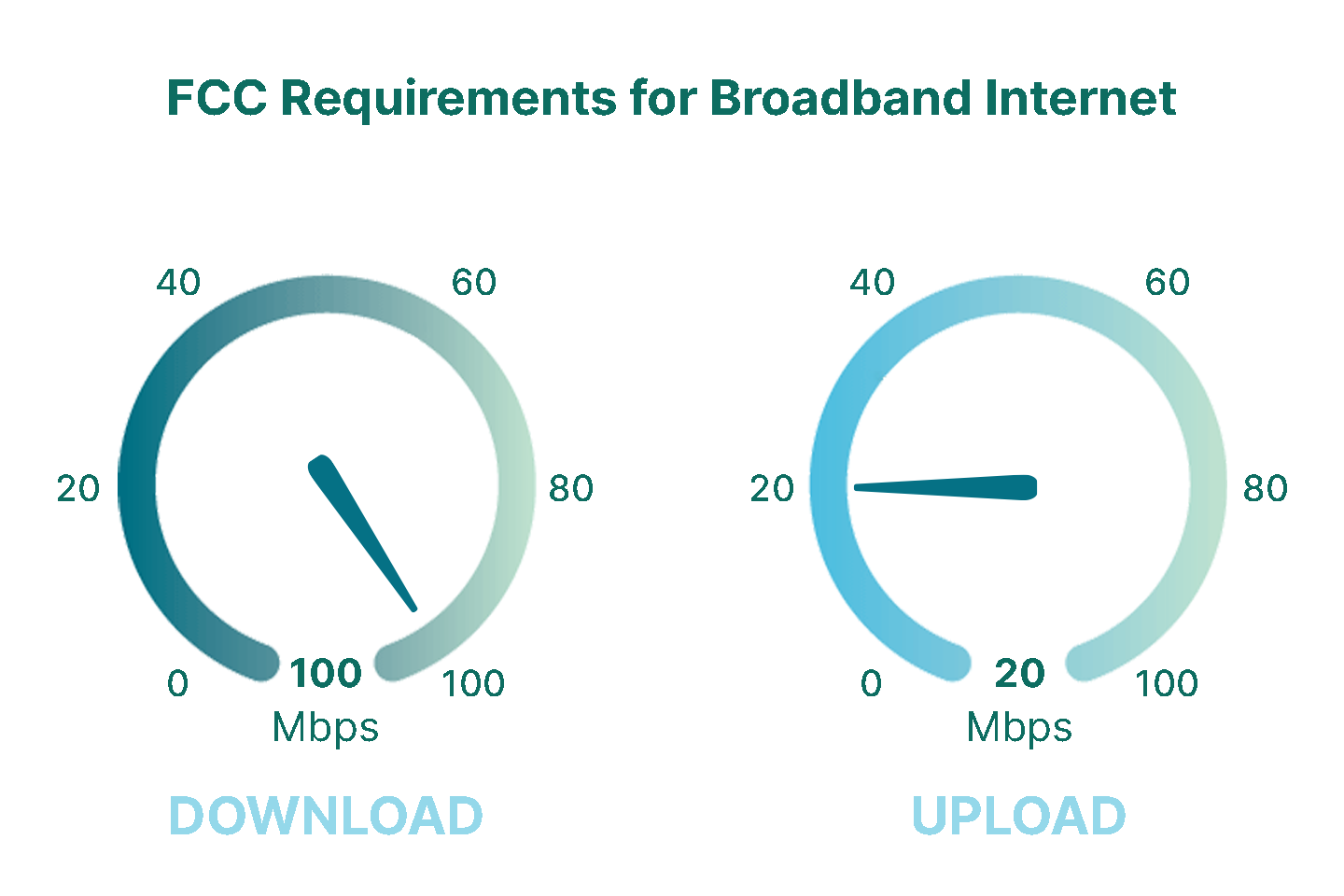
Download speed is the rate at which data is transferred from the internet to your device, and, conversely, upload speed is the rate at which data is transferred from your device to the internet.
Broadband Internet vs. High-speed Internet
While these terms are often used interchangeably, they aren’t always identical in meaning. Broadband is the technical term, while high-speed internet is the more commonly used term by consumers. While you can learn more about internet speed, it’s important to note that different activities require different bandwidths, and households with multiple users and devices will benefit from faster speeds.
The FCC’s guidelines are based on minimum speeds necessary for modern internet usage. While 25 Mbps was once enough for streaming video or browsing the web, today’s households need much more to avoid buffering, lag, or slow downloads. The updated 100 Mbps download and 20 Mbps upload benchmark better reflects current usage, especially for families with multiple users and connected devices.
100 Mbps might be adequate for a single user or light usage, but it may fall short when a family of four is streaming, gaming, and working online simultaneously. Ultimately, your internet speed needs will depend on your household size, online habits, and the types of activities you do each day.
Minimum Download Speeds Recommended by the FCC by Activity
- General web browsing and email: 1 Mbps
- Checking social media: 1 Mbps
- Console gaming connected to the internet: 3 Mbps
- Streaming standard definition video: 3 – 4 Mbps
- Online multiplayer gaming: 4 Mbps
- Streaming high definition video: 5 – 8 Mbps
- Streaming Ultra HD 4K video: 25 Mbps

Is your internet service slowing you down? We can help you find better service in your area.
Choosing the Right Internet Provider
Picking an internet provider that fits your needs comes down to three things: availability, performance, and total cost. Start by seeing what providers are available in your area, then compare plans side by side.
- Check who’s available at your address
Not every provider serves every home, even within the same city. Our search tool will show you which national and local providers are available near you.
- Compare plan details
- Speed: choose a tier that matches your needs and household (streaming, gaming, remote work, multiple users).
- Upload speed: especially important for video calls, cloud backups, and sending large files.
- Data caps: if you stream a lot or download large games, caps can lead to overage fees; if you know you’ll use a lot of data, look for unlimited data options.
- Total monthly cost: get a complete picture of your monthly costs, from promo pricing, equipment fees, and installation. Know what your cost will be at the end of the promotion before purchasing.
- Contract terms: watch for long commitments, early termination fees, and plan restrictions.
- Check reliability and support
Research the provider’s uptime, issue resolution, and customer service satisfaction.
- Customer reviews: look for patterns in outages, night slowdowns, and billing issues.
- Support access: check support hours and how support is managed (phone, chat, local techs, etc).
Uptime reputation: look for providers known for consistent service, especially if you work from home.
Types of Broadband Connections
There are several types of broadband internet services. Each connection type is capable of different speeds (some faster than others), and each internet provider usually offers plans of varying speeds. Each option comes with pros, cons, and different levels of accessibility.
Comparing the Different Types of Broadband Internet Service
| Connection Type | Speed Range | Availability | Best For | Drawbacks |
| Fiber | 300 Mbps – 10 Gbps | Limited but growing | Remote work, 4K streaming | Expensive, not widely available |
| Cable | 100 Mbps – 1 Gbps | Urban and suburban | Streaming, gaming | Shared bandwidth |
| 5G home internet | 100 – 300 Mbps | Growing (coverage varies by address) | Simple home setup, good alternative to cable and DSL | Limited availability in some rural areas |
| DSL | 5 – 100 Mbps | Widespread | Basic usage in rural areas | Slower, distance-sensitive |
| Satellite (LEO) | 50 – 250+ Mbps | Broad coverage (needs a clear sky view) | Rural homes that need lower-latency satellite internet | Equipment cost, obstruction, and weather issues, speeds vary with congestion |
| Satellite (GEO) | 25 – 100 Mbps | Nationwide | Rural areas with no wired ISPs | Very high latency, performance policies, and data limits, expensive |
| Connection Type | Fiber |
| Speed Range | 300 Mbps – 10 Gbps |
| Availability | Limited but growing |
| Best For | Remote work, 4K streaming |
| Drawbacks | Expensive, not widely available |
| Connection Type | Cable |
| Speed Range | 100 Mbps – 1 Gbps |
| Availability | Urban and suburban |
| Best For | Streaming, gaming |
| Drawbacks | Shared bandwidth |
| Connection Type | 5G home internet |
| Speed Range | 100 – 300 Mbps |
| Availability | Growing (coverage varies by address) |
| Best For | Simple home setup, good alternative to cable and DSL |
| Drawbacks | Limited availability in some rural areas |
| Connection Type | DSL |
| Speed Range | 5 – 100 Mbps |
| Availability | Widespread |
| Best For | Basic usage in rural areas |
| Drawbacks | Slower, distance-sensitive |
| Connection Type | Satellite (LEO) |
| Speed Range | 50 – 250+ Mbps |
| Availability | Broad coverage (needs a clear sky view) |
| Best For | Rural homes that need lower-latency satellite internet |
| Drawbacks | Equipment cost, obstruction, and weather issues, speeds vary with congestion |
| Connection Type | Satellite (GEO) |
| Speed Range | 25 – 100 Mbps |
| Availability | Nationwide |
| Best For | Rural areas with no wired ISPs |
| Drawbacks | Very high latency, performance policies, and data limits, expensive |
DSL Internet
DSL internet (Digital Subscriber Line) uses existing copper phone lines to deliver internet service to most homes.
Pros
Doesn’t require new wiring, uses existing phone lines
Widely available, even in some rural areas
Cons
One of the slower broadband connections
Speed depends heavily on proximity to provider’s network hub
Top DSL Internet Providers

- Simplified pricing
- Unlimited data included
- No annual contract required

- Unlimited data
- Rural availability
- Free installations
Cable Internet
Cable internet uses copper coaxial cables, the same way you get cable TV, to transmit data to a modem in your home.
Pros
Widely available in urban and suburban areas
Faster speeds than other broadband connections
Cons
Uses a shared connection that can be affected by other users in your neighborhood
It’s not as fast as fiber, but it can reach multi-gig speeds
Top Cable Internet Providers

- Same-day installations
- 22+ million free Wi-Fi hotspots
- Unlimited data available

- Contract buyouts up to $500
- Free access to Wi-Fi hotspots
- Nationwide availability
Fiber Internet
Fiber internet transfers data as light pulses through fiber-optic cables comprised of thin glass filaments.
Pros
Fastest upload and download speeds available
Can support 4K video streaming, online gaming speeds, and telecommuting
Cons
Tends to be the most expensive broadband internet option
Not as widely available, but providers are investing in fiber infrastructure
Top Fiber Internet Providers
- Fiber & DSL provider
- Wi-Fi router included
- Unlimited data included

- Best internet protection
- Unlimited data included
- No credit checks
Satellite Internet (LEO)
Low-earth orbit satellite internet transmits internet signals between a provider’s ground network, a constellation of satellites orbiting just a few hundred miles above Earth, and a dish installed at your home. The shorter distance to orbit is what gives LEO satellite its speed and low-latency advantage over traditional satellite service.
Pros
Much lower latency than traditional satellite; typically 20–60ms, comparable to cable
Speeds fast enough for streaming, video calls, gaming, and remote work
Cons
Higher upfront equipment costs than most other broadband types
Speeds can vary with network congestion, weather, and dish obstructions
Top LEO Satellite Internet Provider

- High-speed satellite internet
- Low-latency connection
- No annual contracts
Satellite Internet (GEO)
Traditional geostationary satellite internet transmits signals between a provider’s network hub, a satellite orbiting roughly 22,000 miles above Earth, and a dish at your home. That fixed orbit means near-universal coverage, but the long signal distance results in high latency that LEO satellites and other broadband types don’t share.
Pros
Available to nearly 99% of U.S. addresses, including the most remote rural locations
A viable option where no other broadband service exists
Cons
High latency (600ms or more) makes real-time applications like video calls and online gaming difficult
Data thresholds, speed throttling after usage limits, and higher cost per Mbps than most broadband types
Top GEO Satellite Internet Providers

- Fast satellite internet
- Ideal for rural areas
- Up to 3x faster than DSL*

- Satellite internet
- 2-year fixed pricing
- No hard data caps
5G Home Internet
5G home internet, often delivered through 4G LTE or 5G networks, is another form of broadband that’s growing in popularity, especially in rural or underserved areas. Instead of relying on cables or phone lines, this type of internet uses the same mobile networks that power your smartphone.
Pros
Portable and easy to set up
Available in areas with limited wired broadband option
Cons
Speeds can vary based on signal strength and network congestion
Often comes with data caps or throttling after a certain usage
5G Home Internet Providers

- Variety of plans
- Wide availability
- Fiber internet speeds

- Fast symmetrical speeds
- Fiber-optics network
- No annual contracts
Fixed Wireless Internet
Fixed wireless internet delivers internet service through radio signals transmitted from a nearby tower to a receiver installed at your home; no cables or phone lines required.
Pros
Widely available in rural and suburban areas underserved by cable or fiber
Faster with lower latency than satellite internet in most cases
Cons
Requires a clear line of sight to the tower; trees, hills, or buildings can block the signal
Speeds and reliability can vary based on distance from the tower and network congestion
5G Home Internet Providers

- 5G Fixed Wireless Provider
- Contract buyout up to $200
- Pause or cancel anytime for free
Governmental Investment in Broadband
Recognizing the importance of broadband in economic development, governments, especially in the U.S., have invested heavily in expanding internet access. This includes initiatives to improve connectivity in rural and low-income areas, helping ensure more equitable access to high-speed internet for all Americans. Federal and state programs, like the BEAD Program, continue to fund broadband expansion projects, with a focus on underserved communities and long-term digital inclusion.
How Has the Broadband Definition Changed?
The definition of broadband has changed over time. This definition evolves to reflect changes in technology and consumer demand. The last time it changed was in 2024 when the FCC upped its broadband benchmark speeds from 25 Mbps download and 3 Mbps upload to 100 Mbps download and 20 Mbps upload.
The connection types continue to improve, and consumer demand increases, but activities like HD video streaming and online multiplayer gaming also demand more from internet connections.
Want to find the best broadband internet service provider in your area? Enter your zip code below the FAQs to see what is available in your area.
Which Type of Broadband Is Right for You?
With so many connection types available, the best broadband option for your household comes down to three factors: what’s available at your address, how you use the internet, and what you’re willing to spend.
If speed and reliability are your top priorities, and fiber internet is available in your area, it’s the top choice. Fiber offers the fastest and most consistent speeds, symmetrical upload and download speeds, and no shared bandwidth issues.
If you’re in an urban or suburban area without fiber, cable internet is likely your best alternative. It’s widely available, supports high speeds, and handles streaming, gaming, and remote work well, though shared bandwidth can cause slowdowns during peak hours.
If you live in a rural or underserved area, your options may be more limited. Satellite internet (especially low-Earth orbit options like Starlink) has made reliable rural broadband more accessible than ever. Fixed wireless and 5G home internet are also worth checking, as coverage continues to expand.
If cost is your primary concern, DSL and fixed wireless plans often offer the lowest monthly rates, though speeds may be more modest. Some internet providers also offer low-income plans and discount programs, so it’s worth asking about before you sign up.
Not sure what’s available at your address? Enter your ZIP code in our provider search tool to see which providers serve your area and compare plans side by side.
Broadband Internet Frequently Asked Questions
The best broadband option for rural areas often depends on what’s available locally. Satellite internet (like Starlink or Viasat) offers near-universal coverage and is a common choice for remote locations. Fixed wireless and 5G/4G LTE options are also expanding in rural regions and may offer better speeds and lower latency than satellite. In some cases, DSL may still be viable where phone lines exist. Fiber is ideal—but rare in rural areas.
Yes, but the experience depends on the connection speed. A broadband plan with at least 100 Mbps download speed can support multiple users streaming, working, or gaming online. Households with 3–5 active users may benefit from speeds of 300 Mbps or more to avoid slowdowns during peak usage.
Yes. Wired broadband (like fiber, cable, or DSL) uses physical cables to deliver internet, generally offering more stable and faster connections. Wireless broadband (like satellite or 5G home internet) transmits data over the air, which may result in slower speeds or higher latency, especially in areas with signal interference.
It depends on your online habits. A single user browsing and streaming in HD may be fine with 50–100 Mbps. Larger households with multiple people working from home, streaming 4K video, or gaming will likely need 300 Mbps or more. Upload speeds are also important for video conferencing and cloud backups.
Some broadband plans—especially satellite and cellular—impose data caps or slow down speeds after a certain usage threshold. Fiber and many cable providers often offer unlimited data. Always check the fine print to see if your plan includes data limits, soft caps, or throttling policies.
No, broadband and Wi-Fi are related but not the same thing. Broadband refers to your internet connection itself: the service delivered to your home by an internet provider through a cable, fiber, phone line, or wireless signal. Wi-Fi is the technology that wirelessly distributes that internet connection to devices inside your home. Think of broadband as the water supply coming into your house, and Wi-Fi as the pipes that route it to each room. You need a broadband connection first, Wi-Fi just makes it accessible without cables.
Fiber is a type of broadband internet. Broadband is the broader category. It includes any high-speed internet connection that meets the FCC’s minimum speed threshold of 100 Mbps download and 20 Mbps upload. Fiber, cable, DSL, satellite, and fixed wireless are all forms of broadband. What sets fiber apart is how it delivers that connection: using light pulses through glass filaments rather than electrical signals through copper wire. That distinction gives fiber its advantages; faster speeds, symmetrical upload and download performance, and more consistent reliability compared to other broadband types.
By FCC definition, broadband starts at 100 Mbps download and 20 Mbps upload, but real-world speeds vary widely depending on connection type and provider. As of early 2026, the U.S. median fixed broadband download speed is approximately 306 Mbps with a median upload speed of 55 Mbps, ranking the U.S. 8th in the world for fixed broadband speed. Fiber plans commonly offer speeds from 300 Mbps up to 5 Gbps, while cable plans typically range from 100 Mbps to 1 Gbps. DSL and fixed wireless tend to fall in the 25–100 Mbps range. For most households, a plan offering 200–500 Mbps provides a comfortable buffer for streaming, gaming, video calls, and multiple connected devices simultaneously.
Technically, broadband requires a modem, which is the device that connects your home to your provider’s network. A router is what distributes that connection to multiple devices, either through wired Ethernet or Wi-Fi. Many internet providers now provide a combined modem/router unit called a gateway that handles both functions in one device. If you have multiple devices or want Wi-Fi throughout your home, you’ll need a router in addition to your modem, or a gateway. Some broadband types, like fiber and 5G home internet, use slightly different equipment, but the principle is the same: a modem brings the connection in, and a router shares it.
Find providers in your area
Share this post:



Table of Contents