What is Fixed Wireless Internet?
HighSpeedOptions prides itself on providing honest, quality content. While we may be compensated when you make a purchase through links on our site, all opinions are our own. Here's how we make money.
Table of Contents
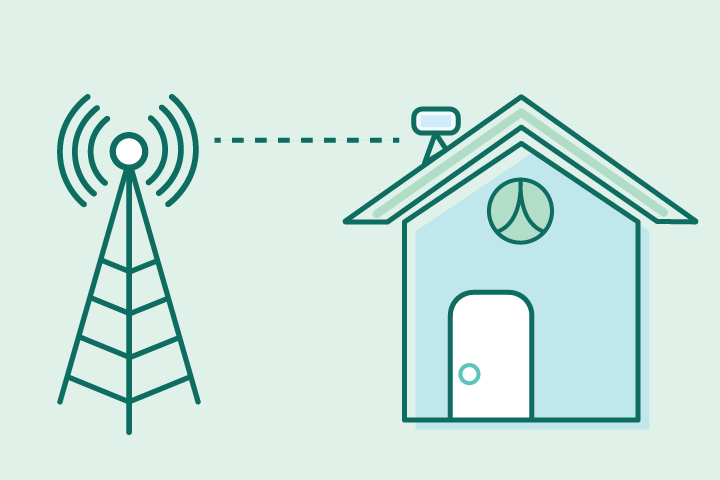
Fixed wireless internet —also called fixed wireless access (FWA)—delivers broadband internet to a fixed location via radio links from a nearby tower to a small outdoor antenna on your home or business. An indoor modem and your Wi-Fi router handle the rest, so there’s no need to trench new cable to the house.
Performance mainly depends on signal quality and line of sight. Fixed wireless is a strong rural internet option and can also serve dense apartment and condo buildings that have a reasonable sightline to a transmitter.
How it differs from 5G home internet: Both use wireless signals, but fixed wireless is fixed to a physical address with a mounted outdoor antenna aimed at a specific tower. 5G home internet uses the cellular network and an indoor gateway that may be portable and subject to cellular deprioritization (traffic management). FWA is a dedicated, fixed link optimized for a single location; 5G home internet is a mobile network service designed for home use.

Ready for fixed wireless internet? Get more information on top fixed wireless providers and find the one that’s right for you.

Fixed Wireless Internet Key Takeaways
- What is fixed wireless internet? Tower-to-home radio link (FWA) to a fixed location—no new cable.
- Typical performance: 25–300 Mbps down, 5–50 Mbps up, 20–60 ms latency.
- What affects it: Line of sight, distance to tower, mount height/placement, interference/spectrum, severe weather.
- Reliability: Stable once aligned; generally less weather-sensitive than satellite.
- Costs & plans: Tiered speeds, pricing similar to cable entry tiers; check equipment/install fees, data caps, post-promo rates.
- Best for: Addresses with reasonable sightlines needing dependable broadband now; pick fiber/cable if you need the lowest jitter or a default public/static IP.
How Does Fixed Wireless Internet Work?
Fixed Wireless Internet works in three simple steps: from a tower, to an antenna, to your Wi-Fi router. Here’s a little more detail on the process:
Tower → Air: Your internet provider sends a signal from a nearby tower or rooftop.
Antenna → Modem: A small outdoor antenna on your home receives that signal and connects to an indoor modem.
Modem → Wi-Fi: Your router shares the connection with your devices over Wi-Fi or Ethernet.
What Affects Fixed Wireless Performance?
Wireless technology has its advantages, but it also has its limitations. The following factors can degrade fixed wireless performance:
- Line of sight: Fewer obstacles (trees, hills, buildings) = stronger signal and more stable speeds.
- Distance to tower: Closer to the tower usually means better speeds and lower latency.
- Mounting & height: Roof or mast mounts clear obstacles and can boost signal quality.
- Interference & spectrum: Licensed spectrum is typically cleaner; unlicensed bands (e.g., 5 GHz) can be noisier in dense areas.
- Weather: Heavy rain or snow can weaken the signal, but fixed wireless is less weather-sensitive than satellite because the path is shorter.
How Fast is Fixed Wireless Internet?
Fixed wireless download and upload speeds, as well as latency, vary by provider, frequency spectrum, and signal quality. You can expect the following speeds with a fixed wireless internet connection:
| Metric | Typical range |
| Download | 25–300 Mbps (higher in select areas) |
| Upload | 5–50 Mbps |
| Latency | 20–60 ms |
| Metric | Download |
| Typical range | 25â300 Mbps (higher in select areas) |
| Metric | Upload |
| Typical range | 5â50 Mbps |
| Metric | Latency |
| Typical range | 20â60 ms |
Common Internet Activities and Fixed Wireless Performance
- 4K streaming: Generally needs 15–25 Mbps per stream; fixed wireless can handle one or more streams on mid/high tiers.
- Videoconferencing: Stable at 5–10 Mbps up/down; prioritize good antenna placement for consistency.
- Gaming: Playable on many setups; fast-twitch shooters are sensitive to jitter. Ask your provider for the typical ping in your neighborhood.
What Are the Pros and Cons of Fixed Wireless Internet?
Pros
Quick installs; no trenching
Viable where cable/fiber isn’t available
Lower latency than satellite
Cons
Needs a line of sight
Performance varies with terrain/obstructions
Availability is location-specific
CGNAT may limit inbound ports/hosting (ask about public/static IP)
How is Fixed Wireless Installed?
The installation process for fixed wireless internet is straightforward. The most important installation step is finding the best place to mount the antenna. Below is a brief overview of how it will be installed at your residence:
- Site survey: Tech checks sightlines, tower direction, and mounting options (e.g., eave, wall, roof, or a short mast).
- Mount & align: The tech will mount the antenna, align it for the strongest possible signal, then run a weather-sealed cable into your home.
- Indoor setup: Connect a router to your modem, and then test speeds and Wi-Fi coverage.
- Clean-up & tips: Tech may suggest a higher mast or different mount if tree growth threatens the line of sight.
Time on site: 1–3 hours for most homes.
How Much Does Fixed Wireless Internet Cost?
Pricing is competitive for fixed wireless, but its price per Mbps may be higher than other connection types.
- Pricing: Typically competitive with cable entry tiers; equipment or install fees may apply.
- Speeds: Sold in tiers (e.g., 25, 50, 100, 200+ Mbps).
- Data caps: Some plans include unlimited data; others have caps or “network management” after a threshold.
- Equipment: Antenna + modem (leased or purchased). You can rent or use your router.
- Contracts: Month-to-month or 12–24 months; watch post-promo price.
Fixed Wireless Internet Providers

- Variety of plans
- Wide availability
- Fiber internet speeds

- Fast symmetrical speeds
- Fiber-optics network
- No annual contracts

- 5G Fixed Wireless Provider
- Contract buyout up to $200
- Pause or cancel anytime for free

- Fast speeds in rural areas
- Affordable prices
- Quick installations
Fixed Wireless Internet vs. Other Types of Internet
| Feature | Fixed Wireless | Cable | Fiber | Satellite | 5G Home Internet |
| Last-mile medium* | Radio (tower→antenna) | Coax | Fiber-optic | Radio to a satellite in orbit | Cellular radio |
| Typical latency | 20–60 ms | 15–40 ms | 5–20 ms | 500+ ms (GEO) / lower for LEO | 30–80 ms (varies) |
| Weather impact | Low–moderate | Low | Low | Moderate–high | Low–moderate |
| Install time | Days | Days–weeks | Weeks–months | Days | Minutes–days |
| Portability | Fixed location | Fixed | Fixed | Fixed & Mobile options | Sometimes portable |
| Notes | Line of sight needed; shared access is common | Good all-around | Best overall | Broadest reach | May throttle/deprioritize |
| Feature | Last-mile medium* |
| Fixed Wireless | Radio (towerâantenna) |
| Cable | Coax |
| Fiber | Fiber-optic |
| Satellite | Radio to a satellite in orbit |
| 5G Home Internet | Cellular radio |
| Feature | Typical latency |
| Fixed Wireless | 20â60 ms |
| Cable | 15â40 ms |
| Fiber | 5â20 ms |
| Satellite | 500+ ms (GEO) / lower for LEO |
| 5G Home Internet | 30â80 ms (varies) |
| Feature | Weather impact |
| Fixed Wireless | Lowâmoderate |
| Cable | Low |
| Fiber | Low |
| Satellite | Moderateâhigh |
| 5G Home Internet | Lowâmoderate |
| Feature | Install time |
| Fixed Wireless | Days |
| Cable | Daysâweeks |
| Fiber | Weeksâmonths |
| Satellite | Days |
| 5G Home Internet | Minutesâdays |
| Feature | Portability |
| Fixed Wireless | Fixed location |
| Cable | Fixed |
| Fiber | Fixed |
| Satellite | Fixed & Mobile options |
| 5G Home Internet | Sometimes portable |
| Feature | Notes |
| Fixed Wireless | Line of sight needed; shared access is common |
| Cable | Good all-around |
| Fiber | Best overall |
| Satellite | Broadest reach |
| 5G Home Internet | May throttle/deprioritize |
*The last mile is the final segment of a network that delivers service from the provider’s local node or tower to the customer’s premises.
How Can I Troubleshoot & Optimize My Fixed Wireless Internet Connection?
Since fixed wireless needs a clear line of sight for top performance, it does require a little bit of maintenance.
- Mount the antenna higher if you have tree lines—clearing a few feet can meaningfully improve performance.
- Trim seasonal foliage on the path to the tower (where permitted).
- Use Ethernet for latency-sensitive devices; keep Wi-Fi channels uncongested.
- Place your Wi-Fi router centrally and away from thick walls, metal, and appliances.
- Log evening speeds for a week by performing an internet speed test. If they’re consistently low, share the data with support.
Is Fixed Wireless Right for Me?
Your location, internet lifestyle, and budget will determine if fixed wireless is right for you.
Choose fixed wireless if you:
- Live rural/suburban with a reasonable sightline to a provider tower.
- Need internet access while waiting for wired builds in your area.
- Want lower latency and more stable streaming than satellite internet.
Consider other internet options if you:
- Have dense tree cover or a steep hill between you and the tower.
- Require public static IPs or advanced port configurations (ask about CGNAT/static IP options).
- Demand near-zero jitter for competitive gaming or specialty real-time apps (fiber is king here).
If you’re interested in fixed wireless internet or want to compare other types of internet connections that are available in your area, enter your zip code below.
Fixed Wireless Internet FAQs
Fixed wireless access is the same concept as fixed wireless internet: a dedicated, stationary link from a nearby transmitter to a receiver at your home or business.
Yes—fixed wireless broadband often serves places where cable or fiber isn’t available, as long as there’s a reasonable line of sight to a tower.
A clear or mostly clear path to the tower gives better speeds and stability; trees, hills, and buildings can reduce performance.
Plans commonly range from tens to a few hundred Mbps with latency around 20–60 ms, depending on signal quality, distance, and the provider.
Signals travel locally (tower to home) instead of to orbit, so latency is typically much lower and weather impacts are generally lighter.
Both use radio, but fixed wireless is aimed at a single address with a mounted antenna, while 5G home internet uses cellular networks and may be portable.
Often yes; look for solid signal quality and low jitter. Ask your provider about typical evening ping in your neighborhood.
Policies vary—some plans are unlimited, others slow or manage speeds after a threshold. Check your plan’s fine print.
Yes—when there’s a clear line of sight to the tower. Mounting the antenna higher or in a better location improves stability. Once it is aligned, service is typically stable, with 25–300 Mbps and higher tiers in select areas.
Find providers in your area
Share this post:



Table of Contents